
核心组件
Agent
代码示例:
# 1.加载环境变量
from dotenv import load_dotenv

load_dotenv()

# 2.定义工具,基础版,通过注释描述工具
@tool
def getWeather(location: str) -> str:
    """
    Get the weather in a given location.
    Args:
        location: city name or coordinates
    """
    return f"Current weather in {location} is sunny"


# 3.定义Agent
agent = create_agent(
    "deepseek-chat", # 模型名称(必须是LangChain支持的模型)
    tools=[getWeather] # 工具集
    # name = "chat_assistant" # Agent 名称(多 Agent 易于区分,好追踪)
)

# 4.调用模型
print("🚀 正在调用大模型...")
response = agent.invoke({
    "messages": [
        {"role": "user", "content": "杭州今天天气如何?"}
    ]
})

# 5.打印结果
print(response)DEEPSEEK_API_KEY=sk-xxxxxxx基本步骤:
1.加载环境变量 -> 2.定义工具 -> 3.定义Agent -> 4.调用Agent
提示
Langchain 提供了 create_agent 方法用来快速创建 Agent,我们只需要提供好 Agent 所需的模型(Models)、工具(Tools)即可。
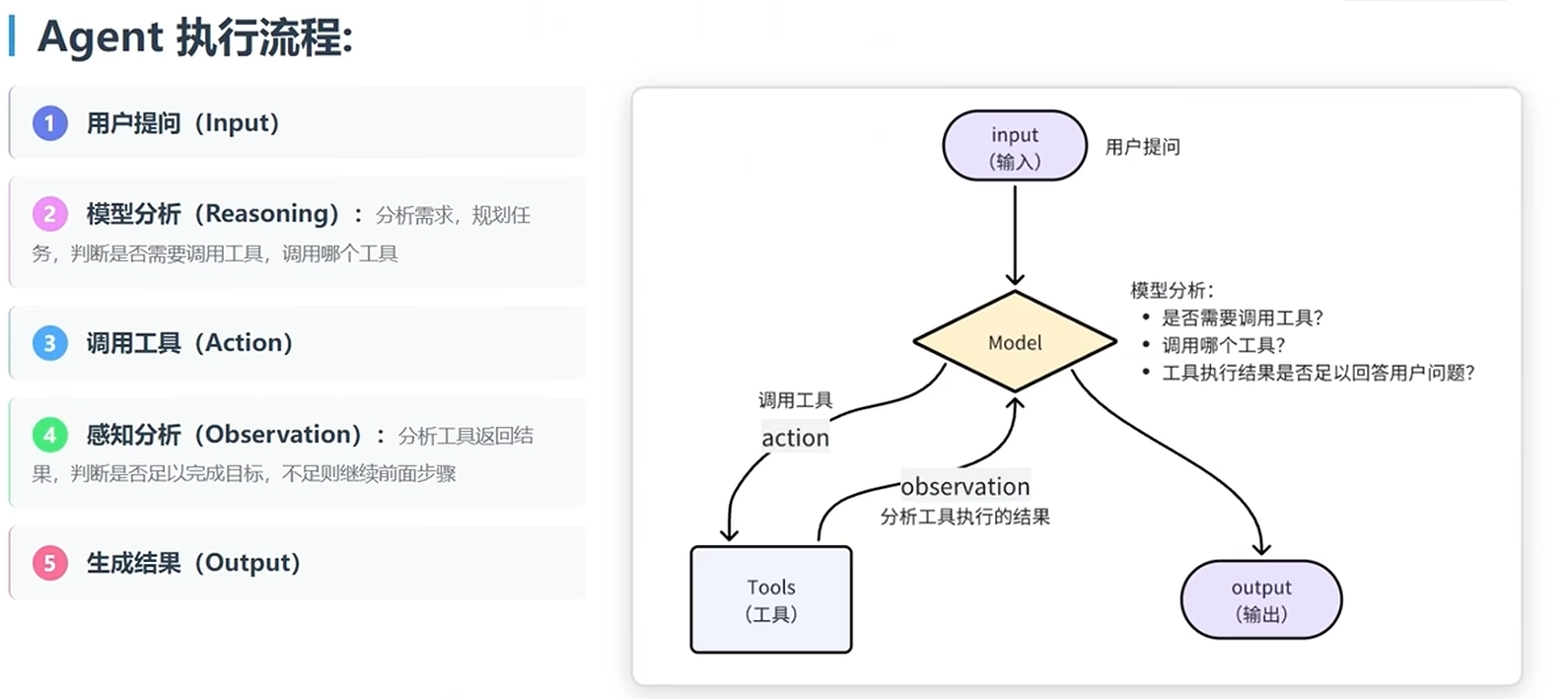
大模型提供的 API 接口中,有一个 tools 参数,描述了工具的详细信息:
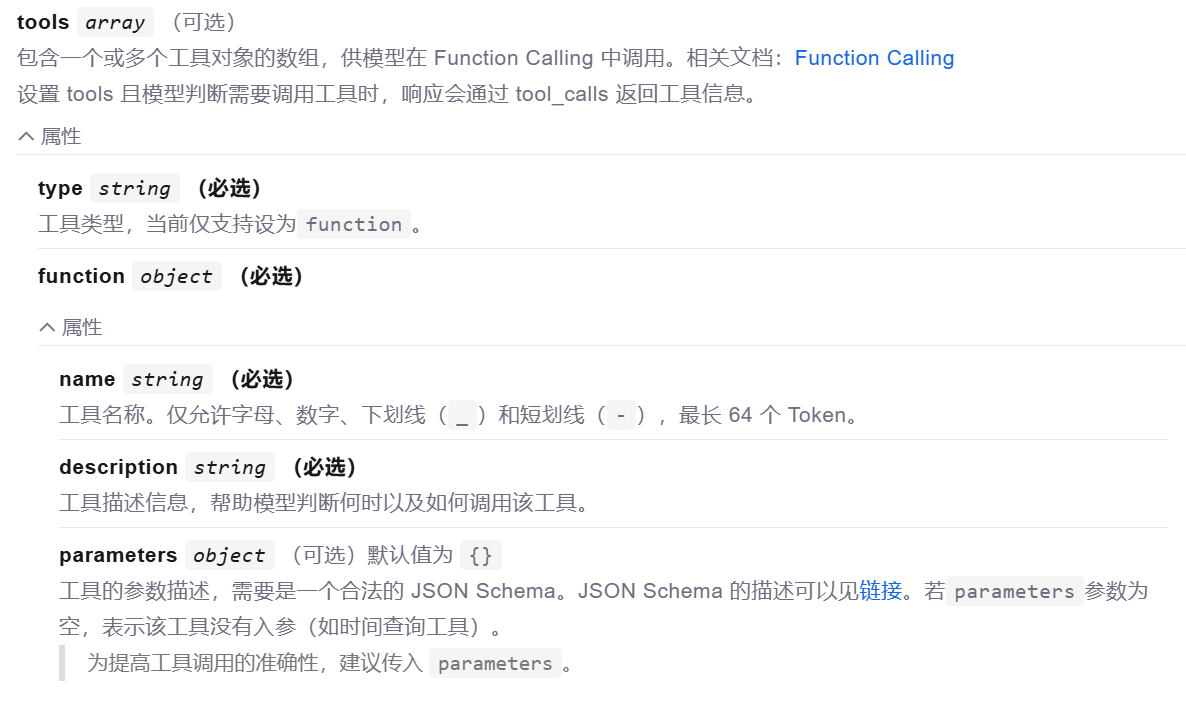
所以,LangChain 会帮助我们把 tool 的信息封装为此 tool 参数,与 message 一起发送给大模型,大模型就了解 tool 的详细信息,根据用户需求判断是否需要调用 tool,需要调用哪个 tool。
模型不能直接调用 tool,只能返回字符串。但是它可以把要调用的 tool信息、参数信息都以 Json 格式返回:
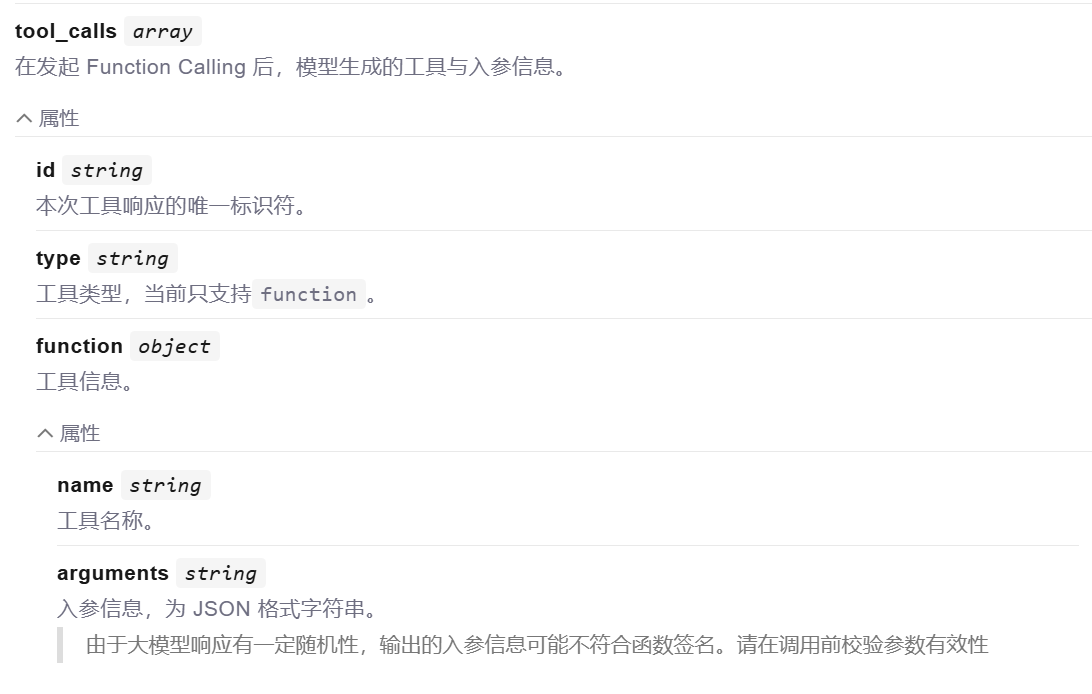
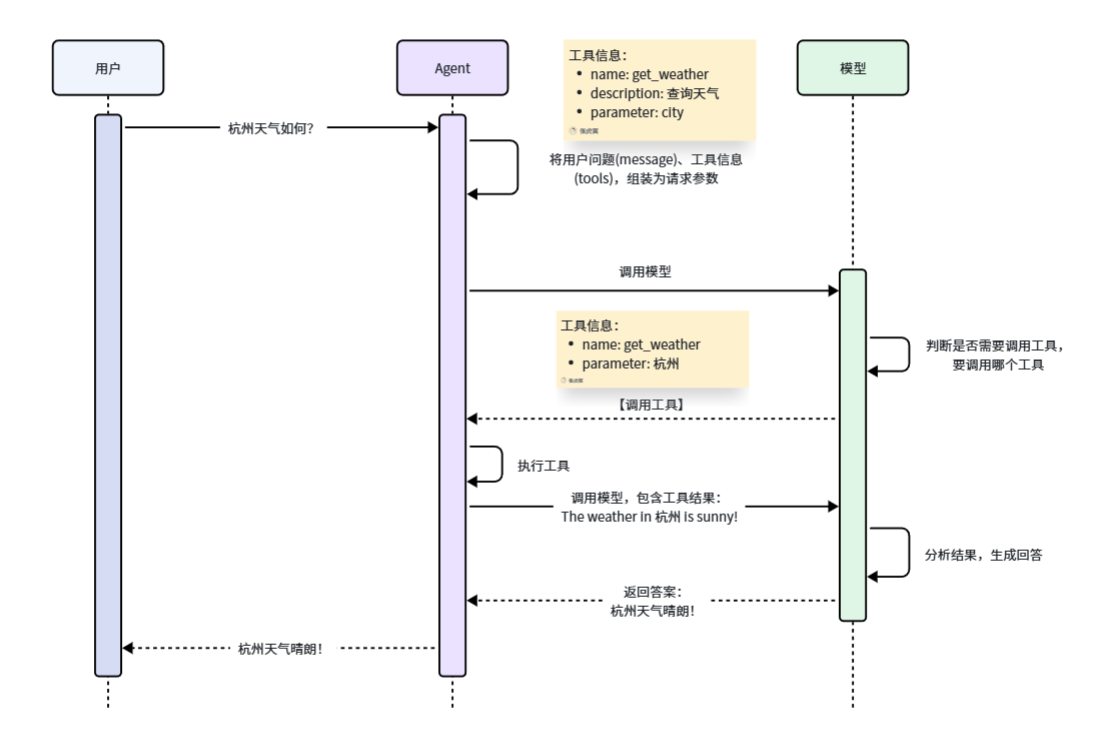
这样一来,LangChain 就会帮我们解析响应结果中的 Function 信息,也就是 tool 信息,就知道了要调用哪个函数,以及参数是什么了。LangChain 就会执行该函数,再把得到的结果再次发送给大模型。
具体的工作流程如图:
常见问题
详情
① Agent 如何选择工具?
依据:工具的 docstring
AI 根据:
    1.问题内容
    2.每个工具描述
    3.自动选择最匹配的工具

② Agent 为什么没有调用工具?
1.工具的 docstring 不清晰
2.问题表述不明确
3.模型认为不需要工具

③ Agent 选错工具?
原因
1.多个工具的功能描述类似
2.工具太多导致混淆
解决
1.只给必要的工具
2.工具描述要有明确区分
3.在系统提示词中说明工具使用场景

④ 如何知道 Agent 何时完成? 当 AIMessage 不包含 tool_calls 时
⑤ Agent 可以调用多少次工具?默认不限制,直到得到最终答案,但可能会:超时、达到 token 限制、模型决定停止
⑥ 如何限制工具调用次数?
# 注意:这是高级用法,后续会详细学习
config = {
    "recursion_limit": 5 # 最多 5 步
}
response = agent.invoke(input, config=config)
Models
这里说的模型,完整叫法是大语言模型(LLM)。它能够理解人类语言,使用人类语言生成内容、翻译、提取摘要、回答问题等。
不仅如此,现在大多数的模型还有一些特别能力:
(1)Tool calling - 调用外部工具(例如查询数据库或调用 API),并在其回复中使用这些工具返回的结果。
(2)Structured output - 将模型的响应结果约束为遵循已定义的格式,例如:json
(3)Multimodality - 可以处理和返回文本以外的数据,如图像、音频和视频。
(4)Reasoning - 模型可以执行多步推理来得出结论。
可以说 LLM 就是 Agent 的大脑,是 Agent 的推理引擎。它驱动 Agent 做出每个决定:何时调用工具、调用哪个工具、如何解释结果,以及何时提供最终答案。
LangChain 支持现在市面上大部分的大语言模型(LLM),并且提供了统一的模型调用接口。使您可以轻松访问许多不同的模型提供者,并且在模型之间进行试验和切换也变得很容易。
初始化模型
init_chat_model
# 导入Langchain的初始化模型的函数
from langchain.chat_models import init_chat_model
# 加载环境变量
from dotenv import load_dotenv
load_dotenv()

# 调用init_chat_model函数初始化模型,参数model用来指定模型名称
model = init_chat_model(model="deepseek-chat")
提示
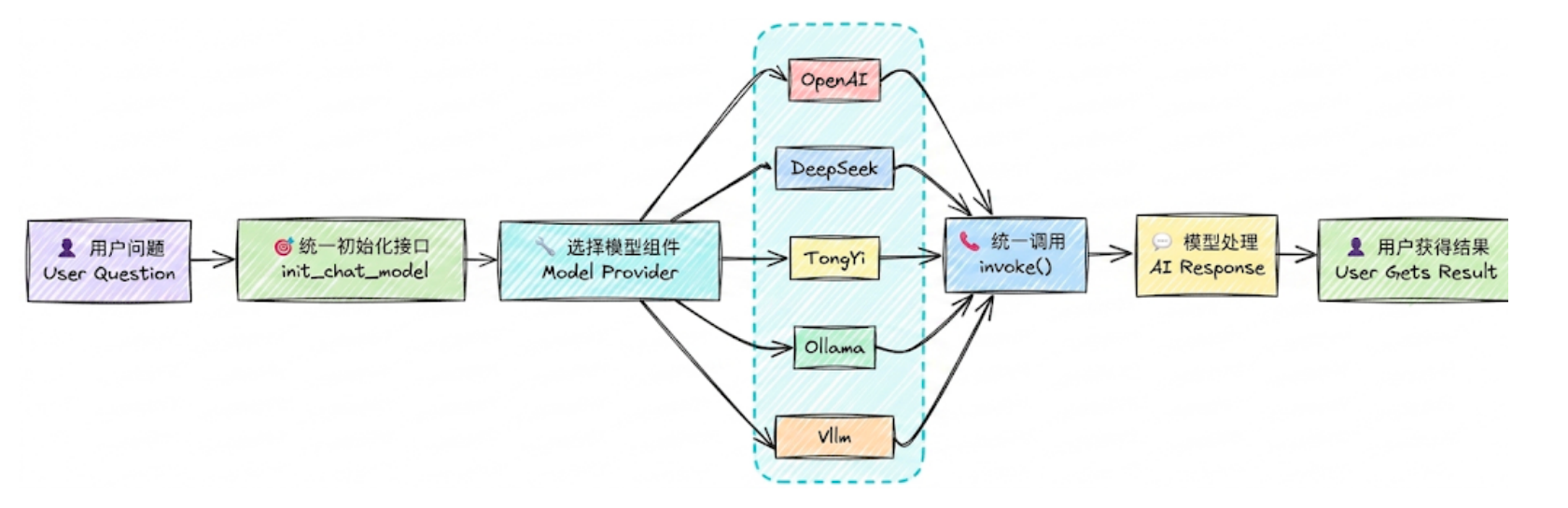
采用init_chat_model自动初始化模型时,模型的类型由 LangChain 通过模型名称自动推断。如果要切换其它模型,我们只需要安装其他模型依赖,然后配置 API_KEY 改变模型名称即可,其他的代码都不用。
init_chat_model默认会根据模型名称自动确定模型的提供者、其 base_url,并从 env 读取 api_key ,但前提是必须是 langchain 支持的模型提供者。如果是其他不支持的模型,我们必须自定义模型参数来访问。
# 初始化模型
model = init_chat_model(
    model="qwen-max", # 模型名称,这里可以自定义
    model_provider="openai", # 如果是Langchain不支持的模型,需要指定模型提供者
    # model="openai:qwen-max",
    base_url=os.getenv("DASHSCOPE_BASE_URL"),
    api_key=os.getenv("DASHSCOPE_API_KEY")
)
可见,通过参数自定义模型时,模型的类型由 model_provider 参数类决定。
除了修改模型提供者以外,init_chat_model方法允许我们调整模型参数,例如:temperature: 控制生成文本的随机性,值越小越确定,值越大越随机max_tokens: 控制生成文本的最大长度top_p: 控制生成文本的多样性,值越小越多样,值越大越确定timeout: 控制生成文本的超时时间max_retries: 控制生成文本的最大重试次数
使用Model类
init_chat_model 方法底层就是帮我们利用 Model 类创建对象。但只支持有限的模型,而在其社区,除了官方提供的Model,还有一些类是社区提供。具体支持的模型,可以查看官网。
例如使用社区版本的 Model 类来访问阿里云百炼的通义千问模型:
(1)安装依赖
# 社区依赖
uv add langchain-community
# 阿里云百炼依赖
uv add dashscope
(2)使用
from langchain_community.chat_models.tongyi import ChatTongyi

# 使用Model类初始化模型
model = ChatTongyi(
    model="qwen-plus"
    # 其它模型参数...
)
访问模型
invoke 阻塞式访问
# 调用invoke方法
response = model.invoke("什么是LLM?")

# 查看响应结果
print(response)
提示
invoke 方法是阻塞式调用,需要等待模型生成全部结果才会返回,等待时间较长。
stream 流式访问
# 通过.stream方法实现流式访问
stream = model.stream("什么是LLM?")

# stream调用返回的结果是一个generator,方便我们循环获取结果
print(type(stream))

# 遍历stream结果,实时打印AI的回复
for chunk in stream:
    print(chunk.content, end="", flush=True)
提示
流式调用可以实时看到AI返回的一个个词。
除了上面的两种访问方式还有 batch() 方法,以及它们的异步版本ainvoke()、astream()、abatch():
batch():批量处理多个输入高并发场景,需要同时处理大量请求
astream():非阻塞式,提高系统吞吐量高并发 Web 应用、IO 密集型任务
ainvoke():非阻塞式,提高系统吞吐量高并发 Web 应用、IO 密集型任务
abatch():非阻塞式,提高系统吞吐量高并发 Web 应用、IO 密集型任务
批量调用
messages = [
    "你好,你是谁?",
    "2 + 3 * 5 = ?",
    "中国的首都在哪里?"
]

responses = model.batch(messages)
# responses = model.batch_as_completed(messages)

for response in responses:
    print(response)
提示
batch() 特点是等待所有请求处理完毕,按原始输入顺序返回结果列表。当输入列表很大或单个模型调用耗时差异显著时,batch_as_completed() 允许应用收到第一个结果后立即返回,而不会等待批次内所有任务完成才响应。即batch_as_completed()每个请求完成后立即 yield结果,结果可能乱序。
但是每个返回的响应都被放在一个元组中,元组的第一个元素是原始输入的 index 索引,可根据索引重新排序。
异步调用
同步(sync):
概念:发起一个任务之后,需要等待该任务完成后,才能继续执行后续任务
表现:当前执行流会被阻塞
异步(async):
概念:发起一个任务之后,不必等该任务完成,就可以继续执行其他任务
表现:当前执行流不会被阻塞
备注:虽然不必等待任务完成,但任务完成后,仍然可以通过特定方式获取结果
在 LangChain 框架中,异步方法与它们的同步版本相比,具备如下特点:
(1)避免阻塞主线程:同步调用会阻塞程序执行,而异步方法让应用程序在等待 API 响应时保持响应性
(2)优化资源利用:异步操作可以更高效地利用系统资源,减少空闲等待时间
import time
import asyncio
from langchain.chat_models import init_chat_model
from dotenv import load_dotenv

load_dotenv()

model = init_chat_model(
    model="deepseek-chat",
)


async def demo_async_invoke():
    print("== 演示:ainvoke 的异步(非阻塞)效果 ==")
    start_time = time.perf_counter()

    print("程序开始...")

    # 1.创建任务 Task
    print(">>> 发起异步模型调用(ainvoke)...")
    async_task = asyncio.create_task(model.ainvoke("用一句话解释人工智能"))
    # 2. 并行执行其他任务
    print(">>> 模型请求已在后台发送,继续执行本地逻辑...")
    for i in range(3):
        await asyncio.sleep(1)  # 使用异步等待,释放控制权
        print(f">>> 正在执行第{i + 1}个任务... (已耗时 {time.perf_counter() - start_time:.2f}s)")
    # 3. 获取模型结果
    print(">>> 本地任务完成,检查模型状态...")

    response = await async_task

    end_time = time.perf_counter()
    print(f">>> 模型返回:{response.content}")
    print(f"== 总运行耗时: {end_time - start_time:.2f}s) ===")


async def main():
    await demo_async_invoke()


if __name__ == "__main__":
    asyncio.run(main())

# 输出:
# == 演示:ainvoke 的异步(非阻塞)效果 ==
# 程序开始...
# >>> 发起异步模型调用(ainvoke)...
# >>> 模型请求已在后台发送,继续执行本地逻辑...
# >>> 正在执行第1个任务... (已耗时 1.00s)
# >>> 正在执行第2个任务... (已耗时 2.00s)
# >>> 正在执行第3个任务... (已耗时 3.00s)
# >>> 本地任务完成,检查模型状态...
# >>> 模型返回:一句话解释人工智能:人工智能是让计算机系统模拟人类智能,通过数据学习和算法优化来执行通常需要人类智慧才能完成的任务(如识别、决策或创造内容)的技术。
# == 总运行耗时: 3.00s) ===import time
import asyncio
from langchain.chat_models import init_chat_model
from dotenv import load_dotenv
load_dotenv()
model = init_chat_model(
model="deepseek-chat",
)
async def demo_async_stream():
print("== 演示:astream 的异步(非阻塞)效果 ==")
start_time = time.perf_counter()
print("程序开始...")
# 1.创建任务 Task
print(">>> 发起异步模型调用(astream)...")
stream_response = model.astream("用一句话解释人工智能")
# 2. 并行执行其他任务
print(">>> 模型请求已在后台发送,继续执行本地逻辑...")
for i in range(3):
await asyncio.sleep(1) # 使用异步等待,释放控制权
print(f">>> 正在执行第{i + 1}个任务... (已耗时 {time.perf_counter() - start_time:.2f}s)")
# 3. 获取模型结果
print(">>> 本地任务完成,检查模型状态...")
end_time = time.perf_counter()
print(">>> 流式输出:", end="", flush=True)
async for chunk in stream_response:
content = chunk.content if hasattr(chunk, "content") else str(chunk)
print(content, end="", flush=True)
print("\n>>> 流式输出结束\n")
print(f"=== 总耗时 {end_time - start_time:.2f}s")
async def main():
await demo_async_stream()
if __name__ == "__main__":
asyncio.run(main())
# 输出:
# == 演示:astream 的异步(非阻塞)效果 ==
# 程序开始...
# >>> 发起异步模型调用(astream)...
# >>> 模型请求已在后台发送,继续执行本地逻辑...
# >>> 正在执行第1个任务... (已耗时 1.00s)
# >>> 正在执行第2个任务... (已耗时 2.00s)
# >>> 正在执行第3个任务... (已耗时 3.01s)
# >>> 本地任务完成,检查模型状态...
# >>> 流式输出:一句话解释人工智能:人工智能是让计算机系统模拟人类智能,通过学习和算法来执行通常需要人类智慧的任务(如视觉识别、语言理解和决策)。
# >>> 流式输出结束
# === 总耗时 3.01simport time
import asyncio
from langchain.chat_models import init_chat_model
from dotenv import load_dotenv
load_dotenv()
model = init_chat_model(
model="deepseek-chat",
)
async def demo_async_batch():
print("== 演示:abatch 的异步(非阻塞)效果 ==")
start_time = time.perf_counter()
print("程序开始...")
# 1.创建任务 Task
print(">>> 发起异步模型调用(abatch)...")
async_task = asyncio.create_task(model.abatch(["用一句话解释人工智能", "中国的首都在哪里?"]))
# 2. 并行执行其他任务
print(">>> 模型请求已在后台发送,继续执行本地逻辑...")
for i in range(3):
await asyncio.sleep(1) # 使用异步等待,释放控制权
print(f">>> 正在执行第{i + 1}个任务... (已耗时 {time.perf_counter() - start_time:.2f}s)")
# 3. 获取模型结果
print(">>> 本地任务完成,检查模型状态...")
response = await async_task
end_time = time.perf_counter()
for res in response:
content = res.content if hasattr(res, "content") else str(res)
print(f">>> 模型返回:{content}")
print(f"== 总运行耗时: {end_time - start_time:.2f}s) ===")
async def main():
await demo_async_batch()
if __name__ == "__main__":
asyncio.run(main())
# 输出:
# == 演示:abatch 的异步(非阻塞)效果 ==
# 程序开始...
# >>> 发起异步模型调用(abatch)...
# >>> 模型请求已在后台发送,继续执行本地逻辑...
# >>> 正在执行第1个任务... (已耗时 1.00s)
# >>> 正在执行第2个任务... (已耗时 2.00s)
# >>> 正在执行第3个任务... (已耗时 3.00s)
# >>> 本地任务完成,检查模型状态...
# >>> 模型返回:人工智能是指通过计算机系统模拟人类智能行为的技术,使机器能够学习、推理、感知和自主决策。
# >>> 模型返回:中国的首都是北京。
# == 总运行耗时: 3.00s) ===如何处理API调用失败
使用 try-except 块捕获异常:
try:
    response = model.invoke('Hello')
    print(response.content)
except ValueError as e:
    print(f"配置错误:{e}")
except ConnectionError as e:
    print(f"网络错误:{e}")
except Exception as e:
    print(f"未知错误:{e}")
在 Agent 中使用模型
创建智能体
创建智能体,指定模型名,由 Langchain 初始化模型:
from langchain.agents import create_agent

# 指定Model名称,由LangChain自动初始化模型
agent = create_agent(model="deepseek-chat")
创建智能体,并使用创建好的 model:
from langchain.agents import create_agent
from langchain_community.chat_models.tongyi import ChatTongyi

# 1.使用Model类初始化模型
model = ChatTongyi(
    model="qwen-plus"
    # 其它模型参数...
)

# 2.使用初始化好的model创建智能体
agent = create_agent(model=model)
调用智能体
阻塞式调用:
# 调用模型,需要传入一个消息列表
response = agent.invoke({
    "messages": [{"role": "user", "content": "什么是LLM?"}]
})

print(response)流式调用:
for token, metadata in agent.stream(
    {"messages": [{"role": "user", "content": "什么是LLM?"}]},
    stream_mode="messages"
):
    if token.content:  # Check if there's actual content
        print(token.content, end="", flush=True)  # Print token
提示
Agent 的 stream 模式同样返回一个 generator,但是其结构由stream_mode参数决定:
① messages: 返回LLM生成的每一个片段,是一个包含token和metadata的元组(Tuple)
② updates: 返回Agent运行过程中的每一次事件,例如与LLM的对话、工具的调用等
③ custom: 返回通过 stream writer 记录的每一次自定义的输出
Messages
消息是 LangChain 中模型上下文的基本单位。它们代表模型的输入和输出,承载了与大语言模型交互时所需的对话状态内容及元数据。消息是包含以下内容的对象:
(1)Role:角色,用于标识消息类型,例如:system、user
(2)Content:内容,表示消息的实际内容,例如:文本、图片、音频等
(3)Metadata:元数据,可选字段,例如:响应信息、消息ID和令牌使用情况
消息类型
在 LangChain 中,我们并不需要自己创建 BaseMessage 对象,LangChain 已经把常见消息根据角色(Role)创建了对应的 BaseMessage 的子类:
(1)System message:role 是 system,代表系统消息,用于设定模型角色和交互背景
(2)Human message:role 是 user,代表用户输入的消息
(3)AI message:role 是 assistant,代表 LLM 生成的响应,包含:文本、工具调用、元数据
(4)Tool message:role 是 tool,代表工具调用时产生的结果
from langchain.messages import HumanMessage, AIMessage
from langchain.agents import create_agent

# 创建Agent
agent = create_agent(model="deepseek-chat")

# 调用Agent,发送消息
response = agent.invoke({
    "messages": [
        HumanMessage(content="你好,我是虎哥"),
        AIMessage(content="你好,虎哥,很高兴认识你。"),
        HumanMessage(content="我的名字是什么?")
    ]
})

print(response)
字典格式
messages = [
    {"role": "system", "content": "You are a poetry expert"},
    {"role": "user", "content": "Write a haiku about spring"},
    {"role": "assistant", "content": "Cherry blossoms bloom..."}
]
response = model.invoke(messages)
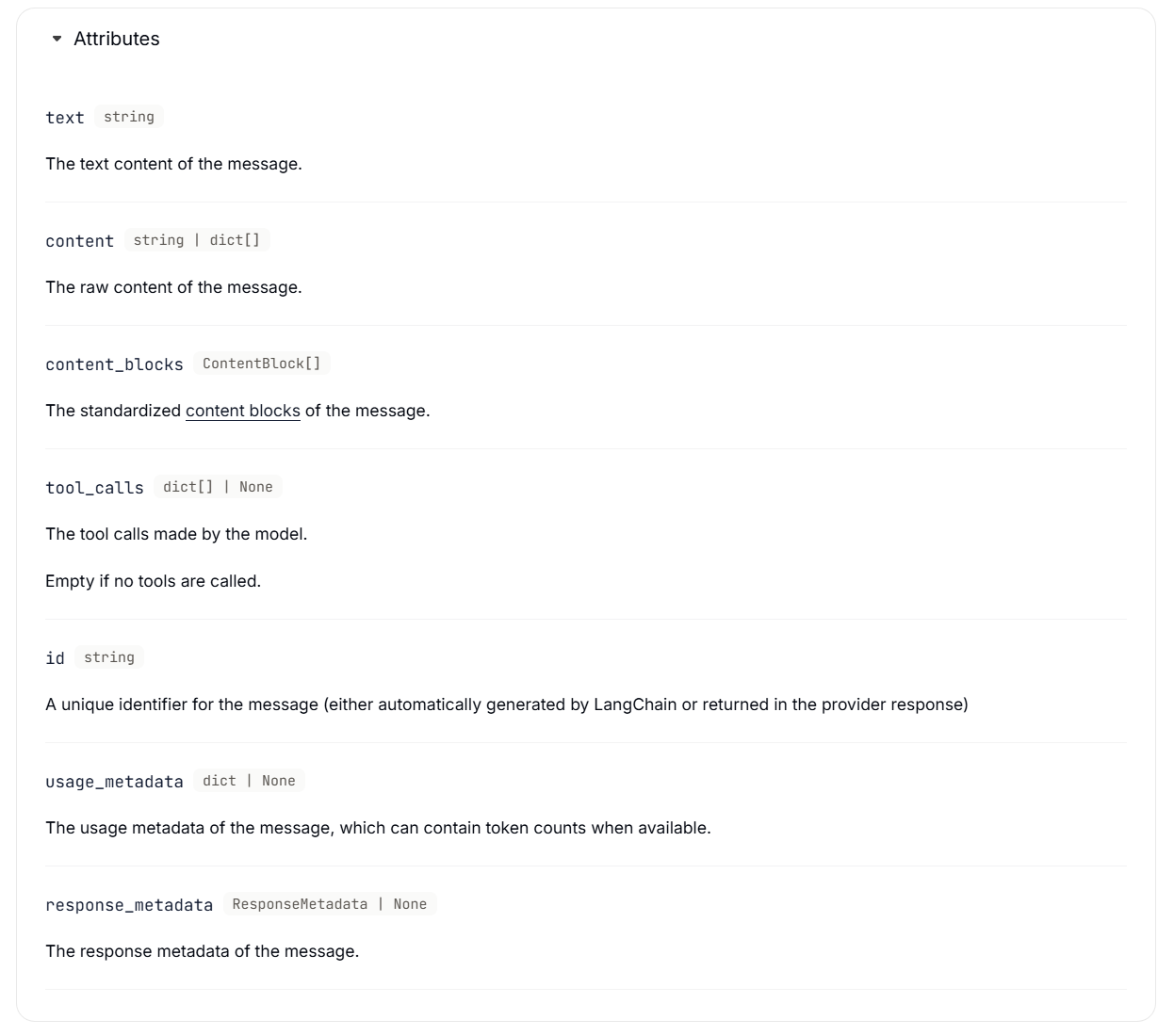
AI message:表示模型调用的输出结果,其中可能包含多模态数据、工具调用以及可后续访问的提供商特定元数据。
属性
(1)Tool calls
from langchain.chat_models import init_chat_model

model = init_chat_model("gpt-5-nano")

def get_weather(location: str) -> str:
    """Get the weather at a location."""
    ...

model_with_tools = model.bind_tools([get_weather])
response = model_with_tools.invoke("What's the weather in Paris?")

for tool_call in response.tool_calls:
    print(f"Tool: {tool_call['name']}")
    print(f"Args: {tool_call['args']}")
print(f"ID: {tool_call['id']}")(2)Token usage
from langchain.chat_models import init_chat_model

model = init_chat_model("gpt-5-nano")

response = model.invoke("Hello!")
response.usage_metadata

# {
#     "input_tokens": 350,
#     "output_tokens": 240,
#     "total_tokens": 590,
#     "input_token_details": {
#         "audio": 10,
#         "cache_creation": 200,
#         "cache_read": 100,
#     },
#     "output_token_details": {
#         "audio": 10,
#         "reasoning": 200,
#     },
# }
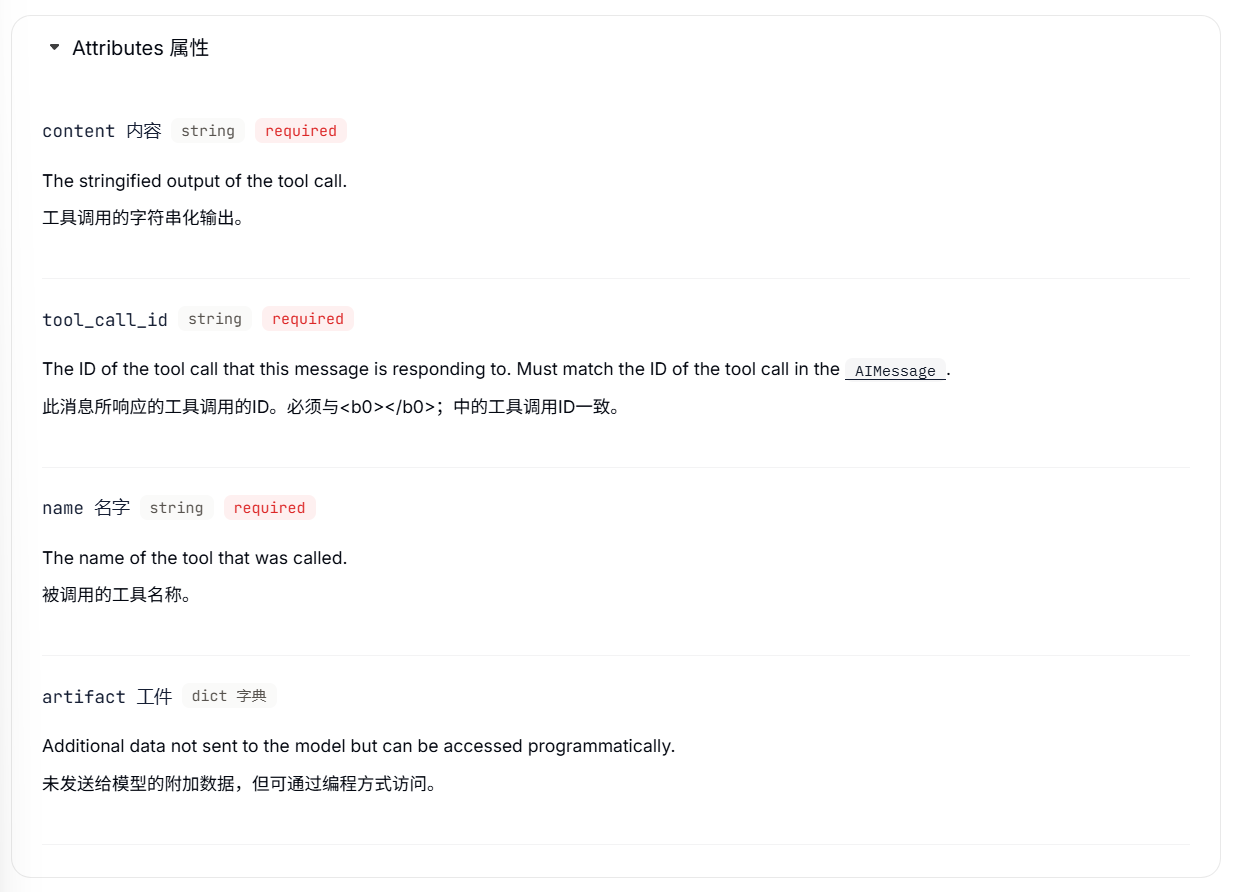
Tool message:对于支持工具调用的模型,AI消息可以包含工具调用。工具消息用于将单次工具执行的结果返回给模型。
from langchain.messages import AIMessage
from langchain.messages import ToolMessage

# After a model makes a tool call
# (Here, we demonstrate manually creating the messages for brevity)
ai_message = AIMessage(
    content=[],
    tool_calls=[{
        "name": "get_weather",
        "args": {"location": "San Francisco"},
        "id": "call_123"
    }]
)

# Execute tool and create result message
weather_result = "Sunny, 72°F"
tool_message = ToolMessage(
    content=weather_result,
    tool_call_id="call_123"  # Must match the call ID
)

# Continue conversation
messages = [
    HumanMessage("What's the weather in San Francisco?"),
    ai_message,  # Model's tool call
    tool_message,  # Tool execution result
]
response = model.invoke(messages)  # Model processes the result
属性
消息内容
from langchain.messages import HumanMessage

# 字符串
human_message = HumanMessage("Hello, how are you?")

# 模型提供商原生格式列出的内容块列表
human_message = HumanMessage(content=[
    {"type": "text", "text": "Hello, how are you?"},
    {"type": "image_url", "image_url": {"url": "https://example.com/image.jpg"}}
])

# LangChain 标准内容模块列表
human_message = HumanMessage(content_blocks=[
    {"type": "text", "text": "Hello, how are you?"},
    {"type": "image", "url": "https://example.com/image.jpg"},
])
多模态消息
前面的消息指的是文本消息,多模态指的是处理以不同形式存在的数据的能力,例如文本、音频、图像和视频。LangChain 包含了这些数据的通用类型,可在不同服务提供商之间使用。聊天模型可以接受多模态数据作为输入,并将其作为输出生成。前提是必须是多模态模型才支持。
# From URL
message = {
    "role": "user",
    "content": [
        {"type": "text", "text": "Describe the content of this image."},
        {"type": "image", "url": "https://example.com/path/to/image.jpg"},
    ]
}

# From base64 data
message = {
    "role": "user",
    "content": [
        {"type": "text", "text": "Describe the content of this image."},
        {
            "type": "image",
            "base64": "AAAAIGZ0eXBtcDQyAAAAAGlzb21tcDQyAAACAGlzb2...",
            "mime_type": "image/jpeg",
        },
    ]
}

# From provider-managed File ID
message = {
    "role": "user",
    "content": [
        {"type": "text", "text": "Describe the content of this image."},
        {"type": "image", "file_id": "file-abc123"},
    ]
}# From base64 data
message = {
"role": "user",
"content": [
{"type": "text", "text": "Describe the content of this audio."},
{
"type": "audio",
"base64": "AAAAIGZ0eXBtcDQyAAAAAGlzb21tcDQyAAACAGlzb2...",
"mime_type": "audio/wav",
},
]
}
# From provider-managed File ID
message = {
"role": "user",
"content": [
{"type": "text", "text": "Describe the content of this audio."},
{"type": "audio", "file_id": "file-abc123"},
]
}# From base64 data
message = {
"role": "user",
"content": [
{"type": "text", "text": "Describe the content of this video."},
{
"type": "video",
"base64": "AAAAIGZ0eXBtcDQyAAAAAGlzb21tcDQyAAACAGlzb2...",
"mime_type": "video/mp4",
},
]
}
# From provider-managed File ID
message = {
"role": "user",
"content": [
{"type": "text", "text": "Describe the content of this video."},
{"type": "video", "file_id": "file-abc123"},
]
}# From URL
message = {
"role": "user",
"content": [
{"type": "text", "text": "Describe the content of this document."},
{"type": "file", "url": "https://example.com/path/to/document.pdf"},
]
}
# From base64 data
message = {
"role": "user",
"content": [
{"type": "text", "text": "Describe the content of this document."},
{
"type": "file",
"base64": "AAAAIGZ0eXBtcDQyAAAAAGlzb21tcDQyAAACAGlzb2...",
"mime_type": "application/pdf",
},
]
}
# From provider-managed File ID
message = {
"role": "user",
"content": [
{"type": "text", "text": "Describe the content of this document."},
{"type": "file", "file_id": "file-abc123"},
]
}提示词
发送给大模型的所有消息都可以称为提示词(Prompt),它直接影响模型的输出结果。其中,SystemMessage 尤为重要,我们把SystemMessage 称为系统提示词(System Prompt),它可以给模型设定角色和本次聊天的背景,对模型生成的内容有很大的影响。
系统提示词
from langchain.agents import create_agent
from langchain.chat_models import init_chat_model
from langchain.messages import HumanMessage, SystemMessage
from dotenv import load_dotenv

load_dotenv()
# 创建智能体
agent = create_agent(
    model="deepseek-v4-flash",
    system_prompt="像海盗一样说话."
)

# 必须使用这种字典+消息列表的格式
response = agent.invoke({
    "messages": HumanMessage("你是谁?"),
})
print(response["messages"][-1].content)
# 输出:哈哈,我是海上的掠夺者,风暴中的幽灵,人称“黑帆”船长!(握拳捶胸)在这片海域,我的名号比鲨鱼的牙齿还锋利!你要不要上我的船,一起去找点金子、喝点朗姆酒?

model = init_chat_model("deepseek-v4-flash")

# 通过列表区分系统指令和用户输入
messages = [
    SystemMessage("像海盗一样说话。"),  # 系统提示词
    HumanMessage("你是谁?")            # 用户输入
]
response = model.invoke(messages)
print(response.content)
# 输出:哟呵呵,我是这片海域里最臭名昭著的老海盗!想知道我的大名?嘿嘿,他们都叫我"老海盗"。
如果没有设定系统提示词,模型会按照训练中的自我认知来回答。
提示词工程
通过优化 System Prompt 从而让模型输出更理想的结果的这一过程,我们称为提示词工程(Prompt Engineering)。
从内容来说,提示词通常包含以下几个部分,通常按此顺序排列:
(1) 身份(Identity):描述AI的职责、沟通风格和总体目标。
(2) 说明(Instructions):请指导模型如何生成所需的响应。它应该遵循哪些规则?模型应该做什么,以及模型绝对不能做什么?
(3) 示例(Examples):提供可能的输入示例,以及模型期望的输出。
(4) 背景信息(Context):向模型提供生成响应所需的任何额外信息,例如RAG的额外知识库数据,或您认为特别相关的任何其他数据。
从格式来说,在编写 System Prompt 时,您可以使用 Markdown 格式和 XML 标签的组合来帮助模型理解提示和上下文数据的逻辑边界。
(1) Markdown 的标题和列表有助于标记提示的不同部分,并向模型传达层级结构。它们还可以提高开发过程中提示的可读性。
(2) XML 标签可以帮助明确区分一段内容(例如用作参考的辅助文档、对话示例等)的起始和结束位置。
示例
# Identity

You are a helpful assistant that labels short product reviews as
Positive, Negative, or Neutral.

# Instructions

- Only output a single word in your response with no additional formatting
  or commentary.
- Your response should only be one of the words "Positive", "Negative", or
  "Neutral" depending on the sentiment of the product review you are given.

# Examples

<product_review id="example-1">
I absolutely love this headphones — sound quality is amazing!
</product_review>

<assistant_response id="example-1">
Positive
</assistant_response>

<product_review id="example-2">
Battery life is okay, but the ear pads feel cheap.
</product_review>

<assistant_response id="example-2">
Neutral
</assistant_response>

<product_review id="example-3">
Terrible customer service, I'll never buy from them again.
</product_review>

<assistant_response id="example-3">
Negative
</assistant_response>
设定角色和详细指令
角色:可以帮助模型认清自己的身份,以对应的身份来回答问题。
指令:告诉模型需要遵循哪些规则,应该做什么,不应该做什么。
示例
from langchain.agents import create_agent
from langchain_core.messages import HumanMessage
from dotenv import load_dotenv

load_dotenv()

system_prompt = """
# 身份
- 你是一个编程助手,你帮助用户编写Python代码。

# 指令
- 定义变量时,使用snake case命名法,而不是camel case命名法。
- 不要返回markdown格式说明,仅仅返回代码即可。
"""

# 创建智能体
agent = create_agent(
    model="deepseek-v4-pro",
    system_prompt=system_prompt
)

response = agent.invoke({
    "messages": [HumanMessage(content="有一个变量描述电子产品的怎么定义名称?")]
})

print(response["messages"][-1].content)
# 输出: electronic_product = "电子产品"
Few-Shot examples
有时候希望模型按照固定的风格来回答问题,但是这种分割不太好描述,哪儿此时就可以通过举例的方式让模型学习例子来回答。用户只需在输入提示中提供几个输入-输出示例,模型就能理解任务模式并生成符合预期的输出。
示例
from langchain.agents import create_agent
from langchain_core.messages import HumanMessage
from dotenv import load_dotenv
load_dotenv()
system_prompt = """
# 身份
- 你是一个科幻作家,根据用户的要求创建一个太空之都。
结构化输出
由于传统程序识别结果化的数据会更加方便,所以有时候希望 LLM 也能输出固定结构的内容,方便我们解析,这种同样可以通过提示词来实现。
示例
from langchain.agents import create_agent
from langchain_core.messages import HumanMessage
from dotenv import load_dotenv
load_dotenv()
system_prompt = """
# 身份
- 你是一个科幻作家,根据用户的要求创建一个太空之都。
在 LangChain 中,实现结构化输出我们只需设定好一个数据类型就可以实现结构化输出。
示例
from pydantic import BaseModel, Field
from langchain.agents import create_agent
from langchain.messages import HumanMessage

# 首先,我们定义一个类,用来封装模型要输出的数据:
class CapitalInfo(BaseModel):
    """首都信息"""
    name: str = Field(description="城市名称")
    location: str = Field(description="城市位置")
    vibe: str = Field(description="城市 vibe")
    economy: str = Field(description="城市经济")

# 然后,我们就可以创建智能体并设置结构化输出的格式了。
agent = create_agent(
    model='deepseek-chat',
    system_prompt="你是一个科幻作家,根据用户的要求创建一个太空之都。",
    response_format=CapitalInfo  # 设置结构化输出的格式
)

response = agent.invoke(
    {"messages": [HumanMessage(content="月球的首都是什么?")]}
)

city = response['structured_response']

print(f"{city.name}位于{city.location},是一座{city.vibe}的城市,其主要产业包括{city.economy}。")
提示
并非所有模型都支持 response_format 参数(结构化输出)
openai.BadRequestError: Error code: 400 - {'error': {'message': 'This response_format type is unavailable now', 'type': 'invalid_request_error', 'param': None, 'code': 'invalid_request_error'}}
During task with name 'model' and id '0dd753e2-0e5f-d863-1c1d-004e83b065e6'但是可以修改结构化输出的策略来满足:ProviderStrategy ToolStrategy,前者是模型提供商的原生结构化输出,后者是工具调用的方式实现
agent = create_agent(
    model='deepseek-chat',
    system_prompt="你是一个科幻作家,根据用户的要求创建一个太空之都。",
    response_format=ToolStrategy(CapitalInfo)  # 设置结构化输出的格式
)
model = init_chat_model(model="deepseek-chat")
structured_output = model.with_structured_output(CapitalInfo)
# 在提示词中明确说明需要输出的字段
response = structured_output.invoke("""你是一个科幻作家,请创建一个月球太空之都的详细信息。
请输出以下信息的 JSON 格式:
- name: 城市名称
- location: 城市位置
- vibe: 城市 vibe
- economy: 城市经济""")
print(response)此种情况下,提示词还是需要注明需要写明 JSON 输出,并且字段写清楚,不然可能出现的字段不全依旧报错
openai.BadRequestError: Error code: 400 - {'error': {'message': "Prompt must contain the word 'json' in some form to use 'response_format' of type 'json_object'.", 'type': 'invalid_request_error', 'param': None, 'code': 'invalid_request_error'}}

# 输出
name='月华之城(Lunaris)' location='位于月球正面风暴洋边缘的熔岩管网络内,北纬20°,西经40°' vibe='未来主义与复古融合,宁静而充满活力,科技感与自然光影交错' economy='以氦-3开采、月球旅游和零重力艺术创作为支柱'

# 不用 with_structured_output 输出
content='```json\n{\n  "name": "月影穹顶",\n  "location": "月球正面,静海盆地东北缘,坐标 18.5°N, 41.3°E,地下与地表复合结构,主穹顶坐落于熔岩管群落上方。",\n  "vibe": "沉静、优雅且略带疏离感的玻璃穹顶文明。空气中有淡淡的臭氧和月尘过滤后的薄荷气息。居民习惯低声交谈,公共空间常回响着低频合成音乐。光照被调节为永远接近黄昏的暖色调,以保留仰望地球时的视觉冲击。",\n  "economy": "以稀有同位素开采(氦-3提纯与月球深层稀土萃取)为基础重工业,辅以真空环境下的精密光学器件制造(无重力环境下的透镜铸造与镀膜)。同时,作为地球与深空之间的高端转运枢纽,拥有全太阳系最著名的零重力拍卖行与低重力艺术画廊。旅游业不占主导,但每年接待限制名额的“地出朝圣团”,单次旅费极高。"\n}\n```' additional_kwargs={} response_metadata={'model_name': 'deepseek-v4-flash', 'id': '90012a6c-ebf9-49e8-9d2d-e5023ea2d424', 'object': 'chat.completion', 'created': 1782374216, 'finish_reason': 'stop', 'model_provider': 'deepseek', 'system_fingerprint': 'fp_8b330d02d0_prod0820_fp8_kvcache_20260402'} id='lc_run--019efdc8-30a0-78d2-984e-cc0480111754-0' tool_calls=[] invalid_tool_calls=[] usage_metadata={'input_tokens': 54, 'output_tokens': 231, 'total_tokens': 285}
Tools
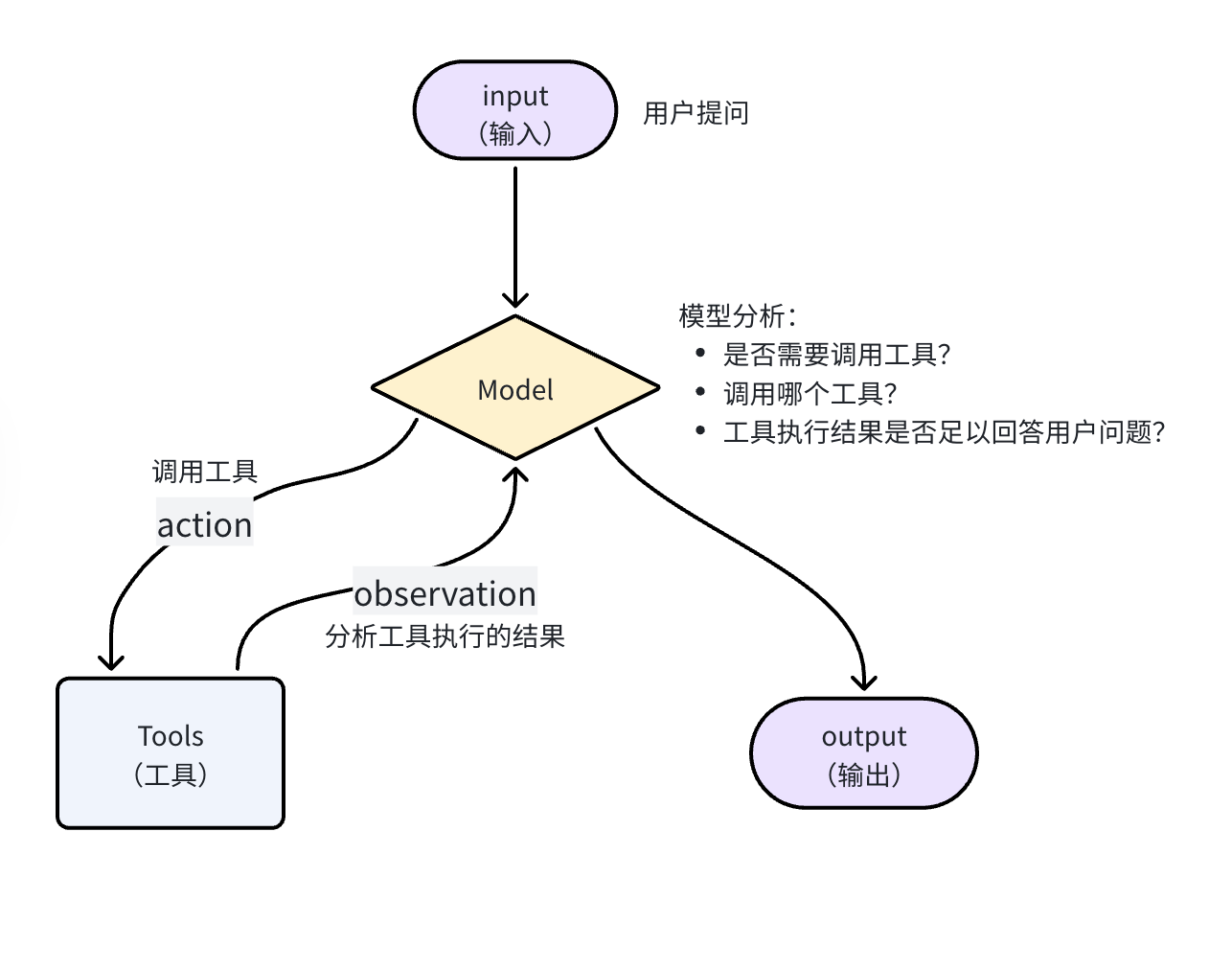
一个完整的 Agent 至少要包含两个关键的部分:
模型:大脑,负责推理、分析、规划任务步骤
工具:手脚,负责执行,与外界交互
基本用法
定义一个带有工具的 Agent 分为两步:
① 使用 tool 装饰器定义工具
# 1.使用tool装饰器定义工具
from langchain.tools import tool

@tool
def get_weather(location: str) -> str:
    """
    Get the weather in a given location.
    Args:
        location: city name or coordinates
    """
    return f"Current weather in {location} is sunny"
② 定义 Agent,绑定工具
from langchain.agents import create_agent
from langchain_core.messages import HumanMessage

# 2.创建智能体,并绑定工具
agent = create_agent(
    model="deepseek-chat",
    tools=[get_weather]
)

# 3.调用Agent
response = agent.invoke(
    {"messages": [HumanMessage(content="杭州今天天气如何?")]},
)

for message in response['messages']:
    message.pretty_print()
输出:
================================ Human Message =================================

杭州今天天气如何?
================================== Ai Message ==================================

好的,我来查询杭州今天的天气情况。
Tool Calls:
  get_weather (call_00_s038ePGJqWFhEscinUFG4621)
 Call ID: call_00_s038ePGJqWFhEscinUFG4621
  Args:
    location: 杭州
================================= Tool Message =================================
Name: get_weather

Current weather in 杭州 is sunny
================================== Ai Message ==================================

杭州今天天气是 **晴朗(sunny)** 🌞,看来是个好天气!

如果你需要更详细的天气信息(比如温度、湿度、风向等),请告诉我,我可以进一步查询。
流程图:
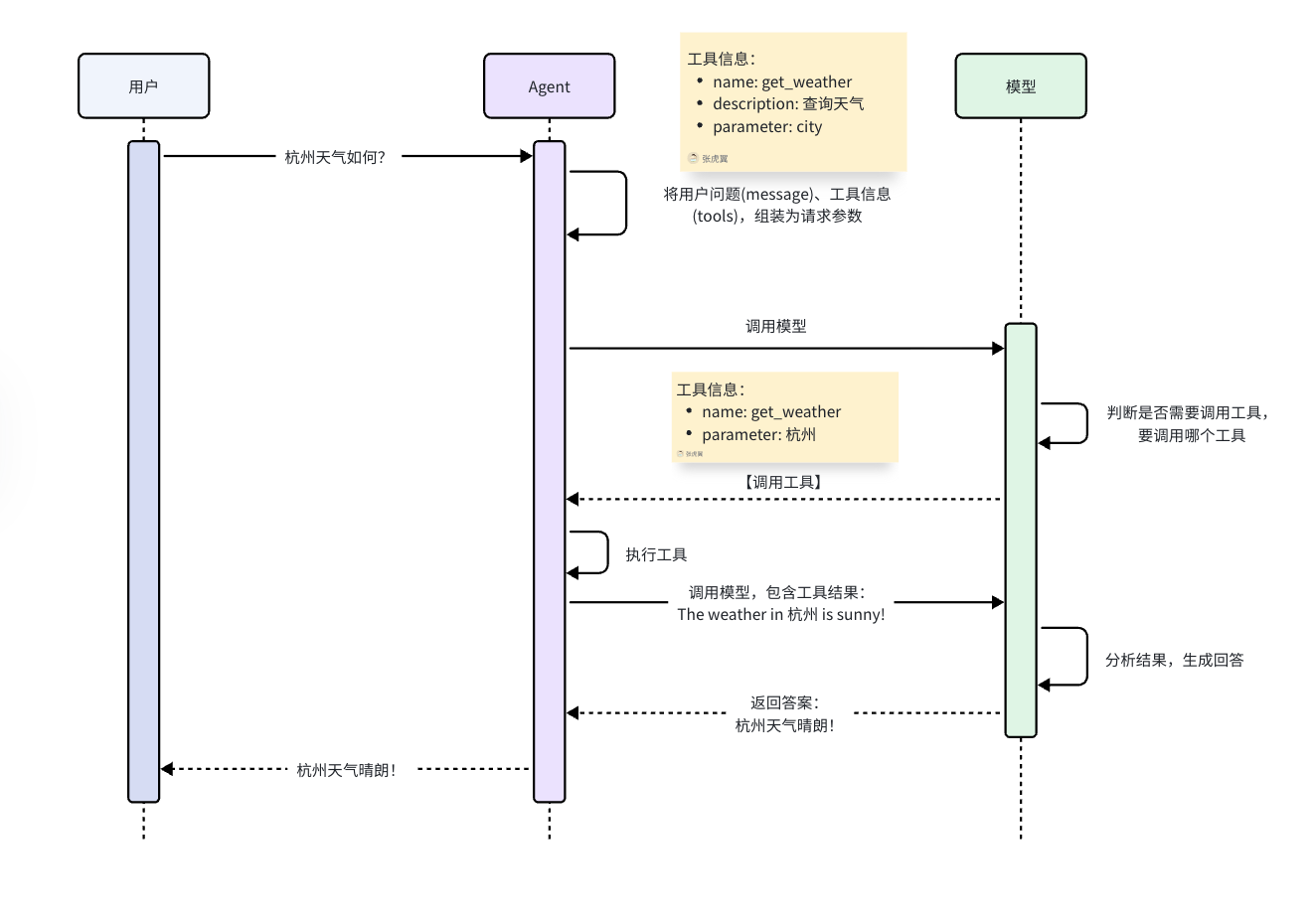
所谓工具,本质就是一个可调用的函数,要想让 Agent 知道有哪些工具可调用,该如何调用这些工具,就必须把这些函数的详细信息发给模型,包括:函数名、函数的作用、函数的参数和返回值信息。所以,定义工具的时候,关键就是把这些信息描述清楚即可。
自定义工具
定义工具的过程在 LangChain 中被大大简化,与定义普通函数几乎没什么差别,只是在一些细节上需要注意。
(1)首先,定义工具需要在函数上添加@tool装饰器
例如,我们定义一个计算平方根的数学工具:
# 定义工具
from langchain.tools import tool

@tool
def square_root(x: float) -> float:
    """计算指定数字的平方根"""
return x ** 0.5智能体在工作时,需要将函数的名称、输入、作用传递给大模型,默认情况下这些信息来源是:
工具名称:函数名
工具输入:函数入参
工作的作用:函数的注释
当然,上面的信息可以被 @tool 装饰器进行覆盖:
通过装饰器定义工具名称:
# @tool(name_or_callable="square_root")
@tool("square_root")
def tool1(x: float) -> float:
    """Calculate the square root of a number"""
    return x ** 0.5
name_or_callable可以省略
通过装饰器定义工具作用描述:
@tool("square_root", description="Calculate the square root of a number")
def tool1(x: float) -> float:
return x ** 0.5通过装饰器定义工具入参约束:
如果要覆盖工具的入参信息比较复杂,就需要借助Pydantic或JSON约束
# 例如一个查询天气的tool
class WeatherInput(BaseModel):
    """查询天气的输入参数."""
    location: str = Field(description="City name or coordinates")
    units: Literal["celsius", "fahrenheit"] = Field(
        default="celsius",
        description="Temperature unit preference"
    )
    include_forecast: bool = Field(
        default=False,
        description="Include 5-day forecast"
    )

# 定义一个查询天气的tool
@tool(args_schema=WeatherInput)
def get_weather(location: str, units: str = "celsius", include_forecast: bool = False) -> str:
    """Get current weather and optional forecast."""
    temp = 22 if units == "celsius" else 72
    result = f"Current weather in {location}: {temp} degrees {units[0].upper()}"
    if include_forecast:
        result += "\nNext 5 days: Sunny"
    return result
提示
在 LangChain 中,作为工具的函数有两个保留的参数名,分别是config与runtime,前者用来传递运行时配置,后者用来传递运行时上下文,在自定义参数时不能与之重复。
具体可参考官方文档:保留参数名(Reserved argument names)
细节问题:
from langchain_core.utils.function_calling import convert_to_openai_tool
from langchain.tools import tool

@tool
def get_weather(city: str): \
        return f"{city}天气晴朗"

print(convert_to_openai_tool(get_weather))
@tool会从 docstring 生成描述信息,同样要求遵循 Google docstring 规范。如果没有则会报错Traceback (most recent call last): ... ValueError: Function must have a docstring if description not provided.
补充 docstring
from langchain_core.utils.function_calling import convert_to_openai_tool
from langchain.tools import tool

@tool
def get_weather(city: str):
    """天气查询工具"""
    return f"{city}天气晴朗"

print(convert_to_openai_tool(get_weather))
输出为:
{
  "type": "function",
  "function": {
    "name": "get_weather",
    "description": "天气查询工具",
    "parameters": {
      "properties": { "city": { "type": "string" } },
      "required": ["city"],
      "type": "object"
    }
  }
}description参数可以更改工具描述,优先级高于 docstring 的函数说明
from langchain_core.utils.function_calling import convert_to_openai_tool
from langchain.tools import tool
from rich import print as rprint

@tool(description="根据城市名称查询当日天气")
def get_weather(city: str):
    """天气查询工具"""
    return f"{city}天气晴朗"

rprint(convert_to_openai_tool(get_weather))
输出:
{
  "type": "function",
  "function": {
    "name": "get_weather",
    "description": "根据城市名称查询当日天气",
    "parameters": {
      "properties": { "city": { "type": "string" } },
      "required": ["city"],
      "type": "object"
    }
  }
}当我们没有向 @tool 传递 description 参数时,默认情况下, tool 会将 docstring 整体视为 description
from langchain_core.utils.function_calling import convert_to_openai_tool
from rich import print as rprint
from langchain.tools import tool

@tool
def get_weather(city: str, units: str = "celsius", include_forecast: bool = False) -> str:
    """
    获取当日天气,可选择是否同时查询未来五日天气预报

    Args:
        city: 城市
        units: 气温单位,可选:celsius-摄氏度,fahrenheit-华氏度
        include_forecast: 是否包含未来五日的天气预报
    """
    temp = 22 if units == "celsius" else 72
    result = f'{city}当天气温: {temp} {"摄氏度" if units == "celsius" else "华氏度"}'
    if include_forecast:
        result += "\n未来五天都是晴天"
    return result

rprint(convert_to_openai_tool(get_weather))
输出:
{
    'type': 'function',
    'function': {
        'name': 'get_weather',
        'description':
'获取当日天气,可选择是否同时查询未来五日天气预报\n\nArgs:\n    city: 城市\n
units: 气温单位,可选:celsius-摄氏度,fahrenheit-华氏度\n    include_forecast:
是否包含未来五日的天气预报',
        'parameters': {
            'properties': {
                'city': {'type': 'string'},
                'units': {'default': 'celsius', 'type': 'string'},
                'include_forecast': {'default': False, 'type': 'boolean'}
            },
            'required': ['city'],
            'type': 'object'
        }
    }
}
通过将 parse_docstring 设置为 True,docstring会被解析,填充到相应的字段描述中。
@tool(parse_docstring=True)
def get_weather(city: str, units: str = "celsius", include_forecast: bool = False) -> str:
输出:
{
    'type': 'function',
    'function': {
        'name': 'get_weather',
        'description': '获取当日天气,可选择是否同时查询未来五日天气预报',
        'parameters': {
            'properties': {
                'city': {'description': '城市', 'type': 'string'},
                'units': {
                    'default': 'celsius',
                    'description':
'气温单位,可选:celsius-摄氏度,fahrenheit-华氏度',
                    'type': 'string'
                },
                'include_forecast': {
                    'default': False,
                    'description': '是否包含未来五日的天气预报',
                    'type': 'boolean'
                }
            },
            'required': ['city'],
            'type': 'object'
        }
    }
}(2)把定义好的工具传递给 Agent:模型就可以得到工具的信息,并根据情况判断是否要调用工具,调用哪个工具
from langchain.agents import create_agent

# 创建智能体,并添加工具
agent = create_agent(
    model="deepseek-chat",
    tools=[tool1, get_weather],
    system_prompt="你是一个智能助手,你使用工具来解决用户问题。"
)(3)开始调用
# 调用智能体
for token, metadata in agent.stream(
    {"messages": [HumanMessage(content="467的平方根是多少?")]},
    stream_mode="messages"
):
    print(token.content, end="", flush=True)


for token, metadata in agent.stream(
    {"messages": [HumanMessage(content="北京和杭州接下来几天天气如何?")]},
    stream_mode="messages"
):
    print(token.content, end="", flush=True)
预定义工具
LangChain 中提供了许多预定义好的工具,方便我们使用,可使用预定义工具列表可参考官网
模型本身只能根据本身的训练数据回答问题,无法获取实时信息,但如果我们提供了 web 搜索的工具,那么 Agent 就如同具备了实时 web 搜索的能力,回答会更加准确。
下面以 Tavily 为例:
from pydantic import BaseModel, Field
from langchain_tavily import TavilySearch

# 使用tavily作为web搜索工具
tavily = TavilySearch(
    max_results=5,
    topic="general"
)


@tool
def web_search(query: str):
    """Search the web for information"""
    return tavily.invoke(query)


# Agent回答内容引用的网页信息
class Reference(BaseModel):
    title: str = Field(description="The title of the web page cited in the answer")
    url: str = Field(description="The url of the web page cited in the answer")


# Agent的回答内容
class AnswerInfo(BaseModel):
    answer: str = Field(description="The final answer for user")
    reference: list[Reference] = Field(description="The web pages cited in the answer")


# 创建智能体,使用预定义工具tavily
agent = create_agent(
    model="deepseek-chat",
    tools=[web_search],
    system_prompt="你是一个智能助手,你使用工具来解决用户问题。",
    response_format=AnswerInfo
)

# 调用agent
response = agent.invoke(
    {"messages": [HumanMessage(content="蒸蚌是什么梗?")]},
)

# 获取结构化输出
print(response['structured_response'])
AI 回答包含信息来源
MCP 工具接入
MCP(Model Context Protocol)是一种开放协议,标准化了应用程序向 LLM 提供工具和上下文的方式。LangChain Agent 可以通过 langchain-mcp-adapters 库使用 MCP Server 上的工具。
安装
pip install langchain-mcp-adapters在 create_agent 中使用 MCP
使用 MultiServerMCPClient 加载 MCP Server 上的工具,然后传入 create_agent 的 tools= 参数:
import asyncio
from langchain_mcp_adapters.client import MultiServerMCPClient
from langchain.agents import create_agent

async def main():
    client = MultiServerMCPClient(
        {
            "math": {
                "transport": "stdio",  # 本地子进程通信
                "command": "python",
                "args": ["/path/to/math_server.py"],
            },
            "weather": {
                "transport": "http",  # HTTP 远程通信
                "url": "http://localhost:8000/mcp",
            },
        }
    )

    tools = await client.get_tools()  # 从 MCP Server 获取工具
    agent = create_agent(
        model="anthropic:claude-sonnet-4-6",
        tools=tools,  # 直接传入 Agent
    )

    result = await agent.ainvoke(
        {"messages": [{"role": "user", "content": "(3 + 5) x 12 等于多少?"}]}
    )

if __name__ == "__main__":
    asyncio.run(main())
传输协议
MCP 支持两种传输机制:
| 协议 | 说明 | 适用场景 |
|---|---|---|
stdio | 客户端将服务器作为子进程启动,通过标准输入输出通信 | 本地工具、简单配置 |
http(streamable-http) | 通过 HTTP 请求通信 | 远程服务器 |
HTTP 鉴权
可通过 headers 字段传递自定义头(如认证信息):
client = MultiServerMCPClient(
    {
        "weather": {
            "transport": "http",
            "url": "http://localhost:8000/mcp",
            "headers": {
                "Authorization": "Bearer YOUR_TOKEN",
                "X-Custom-Header": "custom-value",
            },
        }
    }
)
也支持通过 auth 参数实现自定义鉴权(实现 httpx.Auth 接口)或内置 OAuth 流程。
构建 MCP Server
使用 FastMCP 快速创建 MCP Server:
from fastmcp import FastMCP

mcp = FastMCP("Math")

@mcp.tool()
def add(a: int, b: int) -> int:
    """两数相加"""
    return a + b

@mcp.tool()
def multiply(a: int, b: int) -> int:
    """两数相乘"""
    return a * b

if __name__ == "__main__":
    mcp.run(transport="stdio")
MCP 的额外能力
除 Tools 外,MCP 还暴露了两种能力:
| 能力 | 说明 | LangChain API |
|---|---|---|
| Resources | 暴露文件、数据库记录或 API 响应等数据 | client.get_resources(),转换为 Blob 对象 |
| Prompts | 暴露可复用的提示词模板 | client.get_prompt(),转换为 LangChain Message |
在 Deep Agents 中使用 MCP
Deep Agents 底层同样使用 create_agent,MCP 的接入方式完全一致——通过 tools= 参数传入即可:
from deepagents import create_deep_agent

tools = await client.get_tools()  # 同样的方式获取 MCP 工具

agent = create_deep_agent(
    model="anthropic:claude-sonnet-4-6",
    tools=tools,
    system_prompt="你是一个有用的助手",
)
结构化内容与多模态
- 结构化内容(Structured Content):MCP 工具可以返回机器可解析的数据(如 JSON),通过
ToolMessage.artifact访问 - 多模态工具内容:MCP 工具可以返回图像、文本等多模态内容,通过
ToolMessage.content_blocks标准化访问
Skills:按需加载领域知识
Skills 是一种将领域知识封装为可调用"技能"的架构模式,Agent 按需加载而非一次性全量加载。
核心特征
- 提示词驱动:Skills 主要由专用提示词定义
- 渐进式披露(Progressive Disclosure):根据上下文或用户需求按需加载
- 团队自治:不同团队可以独立开发维护各自的 Skills
- 轻量组合:比完整子智能体更简洁
何时使用 Skills
当需要给单个 Agent 添加多种专业化能力,且不需要强制约束各个 skill 之间的执行顺序时。典型场景:
- 编程助手(不同语言/任务的 Skill)
- 知识库(不同领域)
- 创意助手(不同格式)
基本原理
Agent 在系统提示词中看到精简的 Skill 描述列表,当任务需要时通过工具调用加载完整的 Skill 内容。
方式一:自定义 load_skill 工具(渐进式披露模式)
这是 LangChain 官方教程中演示的模式——通过一个 load_skill 工具,让 Agent 按需加载 Skill 内容:
from langchain.tools import tool
from langchain.agents import create_agent

@tool
def load_skill(skill_name: str) -> str:
    """加载专用的技能提示词。

    可用技能:
    - sql_expert: SQL 查询编写专家
    - code_reviewer: 代码审查专家

    返回技能的提示词和上下文。
    """
    # 从文件/数据库加载技能内容
    skills = {
        "sql_expert": "你是 SQL 专家。擅长编写高效、规范的查询...",
        "code_reviewer": "你是代码审查专家。关注安全性、性能...",
    }
    return skills.get(skill_name, "未找到该技能")

agent = create_agent(
    model="anthropic:claude-sonnet-4-6",
    tools=[load_skill],
    system_prompt=(
        "你是一个有用的助手。\n"
        "你有两个可用技能:sql_expert 和 code_reviewer。\n"
        "使用 load_skill 工具访问它们。"
    ),
)
工作流程:
渐进式披露的优势:
- 减少上下文使用 — 仅加载当前任务需要的 2-3 个 Skill
- 支持团队自治 — 不同团队可独立开发专业 Skill
- 高效扩展 — 可添加数十/数百个 Skill 而不撑爆上下文
- 简化对话历史 — 单 Agent 单线程
扩展方式:
- 动态工具注册:加载 Skill 时同时注册该领域专用工具
- 层级 Skill:Skill 可包含子 Skill,形成嵌套专业化
- 引用感知:Skill 提示词可引用其他资源文件的位置
方式二:使用 SkillsMiddleware(内置中间件)
通过 deepagents 包的 SkillsMiddleware,可以直接为 create_agent 添加 Skill 加载能力:
来源:官方的
create_agentContext management 章节
from deepagents.backends import StateBackend
from deepagents.middleware import (
    FilesystemMiddleware,
    MemoryMiddleware,
    SkillsMiddleware,
    SummarizationMiddleware,
)
from langchain.agents import create_agent

backend = StateBackend()

agent = create_agent(
    model="anthropic:claude-sonnet-4-6",
    tools=[search],
    middleware=[
        FilesystemMiddleware(backend=backend),
        SummarizationMiddleware(model="anthropic:claude-sonnet-4-6", backend=backend),
        MemoryMiddleware(backend=backend, sources=["./AGENTS.md"]),
        SkillsMiddleware(backend=backend, sources=["./skills/"]),
    ],
)
Skill 目录遵循 Agent Skills 标准,每个技能存放在含 SKILL.md 的目录中。
Middleware 采用渐进式披露加载:启动时读取 SKILL.md 前置元数据,任务需要时才读取完整内容。
两种方式的对比
| 特性 | 自定义 load_skill 工具 | SkillsMiddleware |
|---|---|---|
| 实现方式 | 自行编写工具函数 | 导入现成中间件 |
| Skill 标准 | 无强制约束 | 遵循 Agent Skills 标准(SKILL.md) |
| 加载方式 | Agent 主动调用工具 | 中间件自动注入上下文 |
| 渐进式披露 | 手动控制 | 内置元数据→完整内容的两级加载 |
| 适用场景 | 轻量、自定义 Skill | 标准 Skill 目录结构 |
create_agent 的 Harness 能力全景
create_agent 是一个高度可扩展的 Harness,通过 middleware= 参数组合不同的中间件,可以实现与 Deep Agents 同等的全部能力。
官方将 Harness 能力分为六大类:
各能力对应的中间件(官方示例)
| 能力类别 | 说明 | 中间件 |
|---|---|---|
| 执行环境 | 工具、文件系统、沙箱、代码解释器 | FilesystemMiddleware、沙箱后端、QuickJS 解释器 |
| 上下文管理 | 摘要压缩、记忆、Skills、提示缓存 | SummarizationMiddleware、MemoryMiddleware、SkillsMiddleware |
| 规划与委派 | Todo 列表、子智能体 | TodoListMiddleware、SubAgentMiddleware |
| 容错 | 重试、回退、调用限制 | 内置重试机制、自定义中间件 |
| 护栏 | PII 检测、内容控制 | PiiDetectionMiddleware |
| 人机协同 | Human-in-the-loop 审批 | HumanInTheLoopMiddleware(配置 interrupt_on 时自动添加) |
create_agent vs Deep Agents
| 对比维度 | create_agent | Deep Agents (create_deep_agent) |
|---|---|---|
| 定位 | 高度可定制的 Harness,极简核心 | 开箱即用的 Harness |
| 文件系统 | 需手动添加 FilesystemMiddleware | 默认内置 |
| Skills | 需手动添加 SkillsMiddleware | 默认内置 |
| 记忆 | 需手动添加 MemoryMiddleware | 默认内置 |
| 摘要压缩 | 需手动添加 SummarizationMiddleware | 默认内置 |
| 子智能体 | 需手动添加 SubAgentMiddleware | 默认内置(general-purpose) |
| 人机协同 | 按需配置 interrupt_on | 按需配置 interrupt_on |
| MCP 支持 | ✅ 原生(tools= 传入) | ✅ 原生(tools= 传入) |
| 灵活性 | 极高,按需组合 | 较高,通过参数微调 |
| 适用场景 | 需要精细控制 Agent 行为 | 快速搭建复杂多步骤任务 |
总结:Deep Agents 本质上就是
create_deep_agent预装了一套默认中间件栈。如果你需要精细控制,使用create_agent+ 自定义中间件;如果想快速上手,使用 Deep Agents。两者都原生支持 MCP 工具接入。
记忆
模型本事是没有记忆的,它记不住历史会话内容,我们可以通过技术手段,帮助模型记住会话历史,产生记忆。
对于智能体而言,记忆分为两类:
短期记忆(Short-term memory):当前任务或会话的上下文
长期记忆(Long-term memory):跨任务或会话的经验与知识
Short-term memory
由于短期记忆生命周期通常是当前会话,所以也被称为会话记忆。Agent 的会话记忆通常包含三部分:
① 对话历史
② 查询结果
③ 任务状态
LangChain 提供了自动化的记忆管理方案:
(1)LangChain 把会话记忆(Messages 列表)记录为 AgentState 的一部分
(2)AgentState 通过 Checkpointer 对象来保存,每一次与AI的交互都会生成一个快照,记录为一个 checkpoint,把同一会话的所有 checkpoint 组合在一起,就是完整的会话历史了
(3)为了区分不同的会话记忆,不同会话需要设定各自的thread_id,相同会话则使用相同thread_id
(4)向 Agent 发起会话时必须指定自己的thread_id以唤起对应的会话记忆
InMemorySaver:基于内存存储
# langchain提供的checkpointer的默认实现,基于内存存储
from langgraph.checkpoint.memory import InMemorySaver
from langchain.agents import create_agent
from langchain.messages import HumanMessage
from langchain_core.runnables import RunnableConfig
from dotenv import load_dotenv

load_dotenv()
# 创建智能体时指定checkpointer,LangChain会自动帮我们管理历史会话记忆
agent = create_agent(
    "deepseek-chat",
    checkpointer=InMemorySaver()
)

# 设定thread_id,作为会话标识
config: RunnableConfig = {"configurable": {"thread_id": "thread_1"}}

# 第一次调用,告知AI我的信息
response = agent.invoke(
    {"messages": [HumanMessage(content="你好,我叫虎哥,我最喜欢猫猫。")]},
    config  # 调用时添加thread_id,区分不同会话
)

print(response)

# 第二次调用,询问我的信息,这次带上thread_id,唤起记忆
response = agent.invoke(
    {"messages": [HumanMessage(content="我最喜欢的动物是什么?")]},
    config  # 调用时添加thread_id
)

print(response)
输出
{'messages': [HumanMessage(content='你好,我叫虎哥,我最喜欢猫猫。', additional_kwargs={}, response_metadata={}, id='47f68e77-261a-475b-93da-7b39db0cc071'), AIMessage(content='你好,虎哥!🐯  \n很高兴认识你~喜欢猫猫的人一定很温柔!🐱  \n你家里有养猫吗?还是正在“云吸猫”呢?  \n(悄悄说:我这里有超多猫猫冷知识和可爱表情包,随时等你来聊~)', additional_kwargs={}, response_metadata={'model_name': 'deepseek-v4-flash', 'id': 'f4837d49-b6b0-4481-9824-b963e27afcc9', 'object': 'chat.completion', 'created': 1782022558, 'finish_reason': 'stop', 'model_provider': 'deepseek', 'system_fingerprint': 'fp_8b330d02d0_prod0820_fp8_kvcache_20260402'}, id='lc_run--019ee8d2-52f6-7083-a602-393f98f7144a-0', tool_calls=[], invalid_tool_calls=[], usage_metadata={'input_tokens': 15, 'output_tokens': 62, 'total_tokens': 77})]}
{'messages': [HumanMessage(content='你好,我叫虎哥,我最喜欢猫猫。', additional_kwargs={}, response_metadata={}, id='47f68e77-261a-475b-93da-7b39db0cc071'), AIMessage(content='你好,虎哥!🐯  \n很高兴认识你~喜欢猫猫的人一定很温柔!🐱  \n你家里有养猫吗?还是正在“云吸猫”呢?  \n(悄悄说:我这里有超多猫猫冷知识和可爱表情包,随时等你来聊~)', additional_kwargs={}, response_metadata={'model_name': 'deepseek-v4-flash', 'id': 'f4837d49-b6b0-4481-9824-b963e27afcc9', 'object': 'chat.completion', 'created': 1782022558, 'finish_reason': 'stop', 'model_provider': 'deepseek', 'system_fingerprint': 'fp_8b330d02d0_prod0820_fp8_kvcache_20260402'}, id='lc_run--019ee8d2-52f6-7083-a602-393f98f7144a-0', tool_calls=[], invalid_tool_calls=[], usage_metadata={'input_tokens': 15, 'output_tokens': 62, 'total_tokens': 77}), HumanMessage(content='我最喜欢的动物是什么?', additional_kwargs={}, response_metadata={}, id='caa36b2b-dc5d-4ff1-bd70-f2d8a4c6c006'), AIMessage(content='哈哈,虎哥,你刚才不是说了嘛~🐯  \n你最喜欢的动物是 **猫猫**!🐱  \n(而且你还说过“最喜欢猫猫”,我可都记着呢~😉)  \n\n需要我分享点猫猫的冷知识,或者帮你云吸猫吗?', additional_kwargs={}, response_metadata={'model_name': 'deepseek-v4-flash', 'id': '171e7f7e-ebfa-4fad-b200-b8a102dc96f0', 'object': 'chat.completion', 'created': 1782022560, 'finish_reason': 'stop', 'model_provider': 'deepseek', 'system_fingerprint': 'fp_8b330d02d0_prod0820_fp8_kvcache_20260402'}, id='lc_run--019ee8d2-5a29-7fc0-87b0-d430393c358c-0', tool_calls=[], invalid_tool_calls=[], usage_metadata={'input_tokens': 86, 'output_tokens': 61, 'total_tokens': 147})]}
由于两次调用使用了相同的
thread_id,被认定为是同一次对话,所以 LangChain 会在请求模型时携带历史对话的 Messages,模型就能根据历史消息来正确回答了
持久化 Memory
LangChain 也提供了很多持久化存储的 checkpointer,例如:
SqlLiteSaver :基于 sqlite 存储
PostgresSaver :基于 Postgres 存储
CosmosDBSaver :使用 Azure Cosmos DB 的实现
具体可以参考文档:https://docs.langchain.com/oss/python/langgraph/persistence#checkpointer-libraries
SqlLiteSaver 示例:
① 安装依赖
# pip安装
# pip install langgraph-checkpoint-sqlite

# uv安装
uv add langgraph-checkpoint-sqlite
② 导入依赖并初始化
import sqlite3
from langgraph.checkpoint.sqlite import SqliteSaver

# 初始化checkpointer
checkpointer = SqliteSaver(sqlite3.connect("checkpoint.db", check_same_thread=False))
# 自动建表
checkpointer.setup()
③ 创建 Agent,并设置 checkpointer
# 创建agent
agent = create_agent(
    "deepseek-chat",
    checkpointer=checkpointer,
)
记忆管理策略
由于会话记忆要保存会话的历史,并且在调用 LLM 时携带历史消息列表。而当会话越来越长时,历史消息就可能超过 LLM 的上下文限制。
一旦会话历史超过上下文窗口,就会出现上下文丢失的情况,从而导致丢失记忆,而且即便不丢失,太长的上下文容易让模型出现注意力分散的问题,模型的响应速度、回答质量会大大降低。
为了解决这种问题,通常有下面的手段:
(1)修剪消息:移除前 N 条或者 N 条消息(在调用 LLM 之前)
(2)删除消息:永久删除 LangGraph 状态中的消息
(3)总结消息:总结历史记录中的早期消息,并用摘要替换他们
(4)自定义策略:自定义策略。例如:消息筛选等
具体参考官网:https://docs.langchain.com/oss/python/langchain/short-term-memory#common-patterns
修剪消息
修剪消息并不是真正的删除消息,在 AgentState 中的消息列表依然是完整的,只不过发送给 LLM 之前会进行修剪,只保留一部分消息。
删除消息
删除消息与修剪消息不同:
修剪消息:只是从 State 中选取一部分消息发送给模型
删除消息:直接删除 State 中保存的消息,也就是说消息历史中不在存在
总结消息
不管是修剪还是删除,都会导致一部分消息丢失,从未丢失记忆,所以就有了总结消息(Summarize messages)。
它的思路很简单就是把历史的消息利用大模型总结出摘要,然后把最新的消息拼接在一起作为新的消息列表发给大模型,这样既不会超出模型上下文窗口限制,还能尽量保留所有的记忆。
LangChain提供了总结消息的默认实现:SummarizationMiddleware
① 初始化SummarizationMiddleware和checkpointer
from langchain.agents.middleware import SummarizationMiddleware
from langgraph.checkpoint.memory import InMemorySaver

# 初始化checkpointer
checkpointer = InMemorySaver()
# 初始化中间件
middleware = SummarizationMiddleware(
    model="deepseek-chat",
    trigger=("messages", 3), #  触发时机,当消息数超过3时,进行总结
    keep=("messages", 1) #  保留的会话数,超过2条
)
SummarizationMiddleware 参数说明
官方参数:model:会话摘要时要使用的模型
trigger:会话摘要的触发时机,有三种设置:
fraction (float): 模型上下文大小的比例(0-1)
tokens (int): 令牌数量
messages (int): 消息数量
keep:指触发摘要后要保留的消息,也就是总结摘要后要保留的消息,例如 Message 在 100 条的时候触发摘要总结,然后 keep 设置的是 20,那么就会将 100 条消息中的 81 条消息总结为 1 条摘要与剩下的 19 条组成 20 条 message。
fraction (float): 要保留的消息占模型上下文大小的比例(0-1)
tokens (int): 要保留的消息的令牌数量
messages (int): 要保留的消息数量
② 创建 Agent,设置middleware和checkpointer
# 创建agent
from langchain.agents import create_agent

agent = create_agent(
    model="deepseek-chat",
    middleware=[middleware],
    checkpointer=checkpointer,
)
③ 调用 Agent
from langchain_core.runnables import RunnableConfig

config: RunnableConfig = {"configurable": {"thread_id": "1"}}
# 制造长会话历史
agent.invoke({"messages": "你好,我是虎哥."}, config)
agent.invoke({"messages": "我最喜欢的运动是乒乓"}, config)
agent.invoke({"messages": "我最喜欢的动物是猫猫"}, config)
# 测试效果
final_response = agent.invoke({"messages": "你还记得我吗?"}, config)

for message in final_response["messages"]:
    message.pretty_print()
测试结果:
================================ Human Message =================================

Here is a summary of the conversation to date:

# SESSION INTENT

建立与用户虎哥的互动关系,了解其兴趣爱好,目前处于兴趣交流阶段,等待用户提出具体任务或需求。

# SUMMARY

- 用户虎哥自我介绍后,先后分享了两项兴趣爱好:最喜欢的运动是乒乓球,最喜欢的动物是猫。
- AI以热情、友好的方式回应,通过提问(乒乓球:比赛类型、打法风格、崇拜的球星等;猫猫:是否养猫、品种、名字、趣事等)展开对话,鼓励虎哥进一步分享。
- 目前处于兴趣交流与关系建立阶段,未涉及具体任务或决策。
- 用户已明确的两项兴趣:乒乓球、猫猫。

# ARTIFACTS

None

# NEXT STEPS

- 等待虎哥回应AI关于乒乓球和猫猫兴趣的追问,了解其具体偏好(打法、球星、养猫情况等)。
- 根据虎哥的后续回应,判断是否可以引导至具体任务或提供相关帮助。
================================ Human Message =================================

你还记得我吗?
================================== Ai Message ==================================

哈哈,当然记得你啦,虎哥!咱们刚才聊得挺开心的——你爱打乒乓球,还喜欢猫猫,对吧?我正等着你跟我多分享点细节呢!比如你打乒乓球是喜欢横拍还是直拍?有没有特别崇拜的球星?家里养猫了吗?或者有没有猫猫的趣事想说说?
Long-term memory
短期记忆记录的是会话级别(线程,Thread)的数据,会话间不共享。而长期记忆记录的是用户特定或者应用级别的数据,任何会话都可以随时访问。
类型划分:
(1)Semantic Memory 语义记忆:即事实类记忆,记录事实、用户偏好、概念,如:用户喜欢简洁回答、用户常用中文等
(2)Episodic Memory 情景记忆:即经验类记忆,记录 Agent 过去执行的动作
(3)Procedural Memory 程序性记忆:即规则、做事方法,如:系统提示词、工作流程、工具调用规则
存储架构
长期记忆的存储:store -> namespace -> key -> value
Store:记忆仓库
Namespace:命名空间,数据类型是由任意长度的 tuple[str,...](字符串元组) 表示的层级路径。用于给长期记忆分组和隔离。
Key:键,namespace 下的唯一标识,单条记忆的唯一键,数据类型为字符串(str)
Value:值,存储的指,类型为字段 dict[str, Any]
举例:
namespace = ('users', 'user_123', 'preferences') # 元组类型
key = 'profile' # 字符串类型
value = {       # 字典类型
    'language': 'zh-CN',
    'style': 'short_direct',
    'likes': ['python', 'RAG']
}
store.put(namespace, key, value)
基础 API 使用
put / get
put:
def put(
        self,
        namespace: tuple[str, ...], # 文档所在的层级路径
        key: str, # 该路径下的唯一键
        value: dict[str, Any], # 保存的指
        index: Literal[False] | list[str] | None = None, # 控制语义检索索引
        *,
        ttl: float | None | NotProvided = NOT_PROVIDED, # 过期时间,可选
) -> None:get:
按照 namespace + key 精确查询,返回完整对象(Item 对象)
def get(
        self,
        namespace: tuple[str, ...], # 文档所在的层级路径
        key: str, # 该路径下的唯一键
        *,
        refresh_ttl: bool | None = None, # 是否刷新当前item的ttl
) -> Item | None:举例:
① 基于 InMemoryStore
from langgraph.store.memory import InMemoryStore

store = InMemoryStore()
namespace = ('user',)
key = 'profile'
value = {
    'name': 'Joke',
    'age': 21,
    'gender': 'male',
}

store.put(namespace, key, value)
print(store.get(namespace, key))

# 输出:Item(namespace=['user'], key='profile', value={'name': 'Joke', 'age': 21, 'gender': 'male'}, created_at='2026-06-28T07:53:20.947937+00:00', updated_at='2026-06-28T07:53:20.947940+00:00')
Item 新增了 created_at 和 updated_at 字段,分别为数据新增和更改时间。
② 基于 PostgresStore
from langgraph.store.postgres import PostgresStore
from psycopg import Connection

conn_string = "postgresql://user:pass@localhost:5432/dbname"

# Using direct connection
# with Connection.connect(conn_string) as conn:
#     store = PostgresStore(conn)
#     store.setup() # Run migrations. Done once

# Using from_conn_string
with PostgresStore.from_conn_string(conn_string) as store:
    store.setup()

    # Store and retrieve data
    store.put(("users", "123"), "prefs", {"theme": "dark"})
    item = store.get(("users", "123"), "prefs")
search
def search(
        self,
        namespace_prefix: tuple[str, ...],
        /,
        *,
        query: str | None = None,
        filter: dict[str, Any] | None = None,
        limit: int = 10,
        offset: int = 0,
        refresh_ttl: bool | None = None,
) -> list[SearchItem]:举例:
① 准备 store
from langgraph.store.memory import InMemoryStore

store = InMemoryStore()

namespace1 = ("users", "Alice", "memories")
key1 = 'preferences'
value1 = {
    "course": "计算机组成原理",
    "sports": "跑步",
    "food": "紫光园奶皮子酸奶"
}

namespace2 = ("users", "Bob", "memories")
key2 = 'preferences'
value2 = {
    "course": "数字电路与模拟电路",
    "sports": "跑步",
    "food": "奶皮子糖葫芦"
}

namespace3 = ("users", "Black", "memories")
key3 = 'preferences'
value3 = {
    "course": "数字电路与模拟电路",
    "sports": "羽毛球",
    "food": "紫光园奶皮子酸奶"
}

store.put(namespace1, key1, value1)
store.put(namespace2, key2, value2)
store.put(namespace3, key3, value3)
② 按照 namespace 前缀搜索
for item in store.search(("users",)):
    print(item)
# 输出
# Item(namespace=['users', 'Alice', 'memories'], key='preferences', value={'course': '计算机组成原理', 'sports': '跑步', 'food': '紫光园奶皮子酸奶'}, created_at='2026-06-30T09:42:14.457907+00:00', updated_at='2026-06-30T09:42:14.458950+00:00', score=None)
# Item(namespace=['users', 'Bob', 'memories'], key='preferences', value={'course': '数字电路与模拟电路', 'sports': '跑步', 'food': '奶皮子糖葫芦'}, created_at='2026-06-30T09:42:14.458965+00:00', updated_at='2026-06-30T09:42:14.458965+00:00', score=None)
# Item(namespace=['users', 'Black', 'memories'], key='preferences', value={'course': '数字电路与模拟电路', 'sports': '羽毛球', 'food': '紫光园奶皮子酸奶'}, created_at='2026-06-30T09:42:14.458971+00:00', updated_at='2026-06-30T09:42:14.458971+00:00', score=None)

for item in store.search(("users", "Alice")):
    print(item)
# 输出
# Item(namespace=['users', 'Alice', 'memories'], key='preferences', value={'course': '计算机组成原理', 'sports': '跑步', 'food': '紫光园奶皮子酸奶'}, created_at='2026-06-30T09:42:14.457907+00:00', updated_at='2026-06-30T09:42:14.458950+00:00', score=None)
③ 按照 filter 过滤
for item in store.search(("users",), filter={"course": "数字电路与模拟电路"}):
    print(item)
# 输出
# Item(namespace=['users', 'Bob', 'memories'], key='preferences', value={'course': '数字电路与模拟电路', 'sports': '跑步', 'food': '奶皮子糖葫芦'}, created_at='2026-06-30T09:45:51.102292+00:00', updated_at='2026-06-30T09:45:51.102292+00:00', score=None)
# Item(namespace=['users', 'Black', 'memories'], key='preferences', value={'course': '数字电路与模拟电路', 'sports': '羽毛球', 'food': '紫光园奶皮子酸奶'}, created_at='2026-06-30T09:45:51.102298+00:00', updated_at='2026-06-30T09:45:51.102298+00:00', score=None)

for item in store.search(("users",), filter={"sports": "羽毛球"}):
    print(item)
# 输出
# Item(namespace=['users', 'Black', 'memories'], key='preferences', value={'course': '数字电路与模拟电路', 'sports': '羽毛球', 'food': '紫光园奶皮子酸奶'}, created_at='2026-06-30T09:45:51.102298+00:00', updated_at='2026-06-30T09:45:51.102298+00:00', score=None)
④ 按照语义搜索
import os

from langchain_community.embeddings import DashScopeEmbeddings
from langgraph.store.base import IndexConfig
from langgraph.store.memory import InMemoryStore
from dotenv import load_dotenv

load_dotenv()
embedding_model = DashScopeEmbeddings(
    model="text-embedding-v4",
    dashscope_api_key=os.getenv("EMBEDDING_API_KEY")
)

index_config: IndexConfig = {
    "dims": 2048,  # 向量维度
    "embed": embedding_model,
    "fields": ["$", "course"]
}

store = InMemoryStore(
    index=index_config
)

namespace1 = ("users", "Alice", "memories")
key1 = 'preferences'
value1 = {
    "course": "计算机组成原理",
    "sports": "跑步",
    "food": "紫光园奶皮子酸奶"
}

namespace2 = ("users", "Bob", "memories")
key2 = 'preferences'
value2 = {
    "course": "数字电路与模拟电路",
    "sports": "跑步",
    "food": "奶皮子糖葫芦"
}

namespace3 = ("users", "Black", "memories")
key3 = 'preferences'
value3 = {
    "course": "数字电路与模拟电路",
    "sports": "羽毛球",
    "food": "紫光园奶皮子酸奶"
}

store.put(namespace1, key1, value1)
store.put(namespace2, key2, value2)
store.put(namespace3, key3, value3)

for item in store.search(("users",), query="数电", limit=2):
    print(item)
# 输出
# Item(namespace=['users', 'Bob', 'memories'], key='preferences', value={'course': '数字电路与模拟电路', 'sports': '跑步', 'food': '奶皮子糖葫芦'}, created_at='2026-06-30T11:33:12.122353+00:00', updated_at='2026-06-30T11:33:12.122359+00:00', score=0.7414745622327604)
# Item(namespace=['users', 'Black', 'memories'], key='preferences', value={'course': '数字电路与模拟电路', 'sports': '羽毛球', 'food': '紫光园奶皮子酸奶'}, created_at='2026-06-30T11:33:12.405634+00:00', updated_at='2026-06-30T11:33:12.405641+00:00', score=0.7414745622327604)
提示
如果只是指定了 query,返回的是所有 namespace 前缀满足要求的 item。底层会按照向量相似度计算查询和候选的 score,输出结果按照 score 降序排序,可以结合 limit 或 filter 限制数量。
初始化 Store 时通过指定索引方式,源码如下:
class IndexConfig(TypedDict, total=False):
    dims: int
    embed: Embeddings | EmbeddingsFunc | AEmbeddingsFunc | str
fields: list[str] | Noneembed: 将输入文本转换为向量的嵌入函数 / 自定义函数 / 嵌入模型对象dims: 输出向量维度fields: 用于计算向量的属性列表["$"]: 将 value 作为整体嵌入["fields1", "fields2"]: 单独指定某个一级字段["parent.child"]: 从内部的嵌套 JSON 对象中获取子字段的值["array[*].field"]: 从 JSON 数组的每个 JSON 对象中获取子字段的值
上面四种形式可以同时出现,fields 列表的每个元素都会生成一个嵌入向量
:::
在 Agent 中访问
工具中使用
① 基于 InMemoryStore
from typing import NotRequired

from langchain.agents import create_agent, AgentState
from dotenv import load_dotenv
from langchain_core.messages import HumanMessage
from langchain.tools import tool, ToolRuntime
from langgraph.store.memory import InMemoryStore

load_dotenv()
store = InMemoryStore()


class CustomState(AgentState):
    user_id: NotRequired[str]


@tool
def save_user_info(name: str, runtime: ToolRuntime) -> str:
    """
    将用户信息保存在长期记忆中
    :param name: 用户名
    :return: 保存状态
    """
    runtime.store.put(("users",), runtime.state["user_id"], {"name": name})
    return "saved"


@tool
def get_user_info(runtime: ToolRuntime) -> str:
    """
    从长期记忆中读取用户信息
    :return: 用户信息
    """
    user_info = runtime.store.get(("users",), runtime.state["user_id"])
    return str(user_info.value) if user_info else "no user info"


agent = create_agent(
    model="deepseek-v4-flash",
    tools=[save_user_info, get_user_info],
    system_prompt="用户提及个人信息时及时记录,用户询问个人信息时尝试用工具检索",
    state_schema=CustomState,
    store=store
)

response = agent.invoke({
    "messages": HumanMessage("你好,很高兴认识你,我是张三"),
    "user_id": "user_1"
})
print(">>" * 10, '第一次会话', "<<" * 10)
for msg in response["messages"]:
    msg.pretty_print()

print(">>" * 10, '第二次会话', "<<" * 10)
response = agent.invoke({
    "messages": HumanMessage("我是谁"),
    "user_id": "user_1"
})
for msg in response["messages"]:
    msg.pretty_print()
详情
>>>>>>>>>>>>>>>>>>>> 第一次会话 <<<<<<<<<<<<<<<<<<<<
================================ Human Message =================================

你好,很高兴认识你,我是张三
================================== Ai Message ==================================

你好,张三!很高兴认识你!😊

我先记下你的名字,这样以后就能记得你了。
Tool Calls:
  save_user_info (call_00_S46PRldwxrXDysoXyaHB9108)
 Call ID: call_00_S46PRldwxrXDysoXyaHB9108
  Args:
    name: 张三
================================= Tool Message =================================
Name: save_user_info

saved
================================== Ai Message ==================================

已经把你的名字记下来啦!以后每次聊天我都能认出你~👋

今天有什么可以帮你的吗?或者想聊点什么话题?
>>>>>>>>>>>>>>>>>>>> 第二次会话 <<<<<<<<<<<<<<<<<<<<
================================ Human Message =================================

我是谁
================================== Ai Message ==================================

让我来查一下您的信息。
Tool Calls:
  get_user_info (call_00_dBPr9GD6GktRIZ372EhS8873)
 Call ID: call_00_dBPr9GD6GktRIZ372EhS8873
  Args:
================================= Tool Message =================================
Name: get_user_info

{'name': '张三'}
================================== Ai Message ==================================

根据我的记录,您是**张三**!请问有什么可以帮您的吗?😊
CustomState 扩展了 Agent 的标准状态,除了模型的 messages 之外,还额外增加了一个 user_id 字段,这样 Agent 在运行过程中随时随地都能知道当前和它说话的用户 ID 是什么。两次的 invoke 没有通过 config 串联起来,是两个独立的对话,但第二个会话可以访问第一个会话写入长期记忆的内容。
② 基于PostgresStore
from typing import NotRequired

from langchain.agents import create_agent, AgentState
from dotenv import load_dotenv
from langchain_core.messages import HumanMessage
from langchain.tools import tool, ToolRuntime
from langgraph.store.postgres import PostgresStore

load_dotenv()


class CustomState(AgentState):
    user_id: NotRequired[str]


@tool
def save_user_info(name: str, runtime: ToolRuntime) -> str:
    """
    将用户信息保存在长期记忆中
    :param name: 用户名
    :return: 保存状态
    """
    runtime.store.put(("users",), runtime.state["user_id"], {"name": name})
    return "saved"


@tool
def get_user_info(runtime: ToolRuntime) -> str:
    """
    从长期记忆中读取用户信息
    :return: 用户信息
    """
    user_info = runtime.store.get(("users",), runtime.state["user_id"])
    return str(user_info.value) if user_info else "no user info"


DB_URI = "postgresql://postgres:postgres@localhost:5432/postgres?sslmode=disable"
with PostgresStore.from_conn_string(DB_URI) as store:
    store.setup()

    agent = create_agent(
        model="deepseek-v4-flash",
        tools=[save_user_info, get_user_info],
        system_prompt="用户提及个人信息时及时记录,用户询问个人信息时尝试用工具检索",
        state_schema=CustomState,
        store=store
    )

    response = agent.invoke({
        "messages": HumanMessage("你好,很高兴认识你,我是张三"),
        "user_id": "user_1"
    })
    print(">>" * 10, '第一次会话', "<<" * 10)
    for msg in response["messages"]:
        msg.pretty_print()

    print(">>" * 10, '第二次会话', "<<" * 10)
    response = agent.invoke({
        "messages": HumanMessage("我是谁"),
        "user_id": "user_1"
    })
    for msg in response["messages"]:
        msg.pretty_print()
中间件中使用
中间件(Middleware)的钩子函数分为两类:Node-style hooks 和 Wrap-style hooks,都可以访问长期记忆。
① Node-style hooks 中访问
Node-style hooks 包括 before_model、after_model 等,通过 Runtime 对象访问长期记忆:
from dataclasses import dataclass
from langchain.agents import create_agent, AgentState
from langchain.agents.middleware import before_model
from langgraph.runtime import Runtime
from langgraph.store.memory import InMemoryStore

@dataclass
class Context:
    user_id: str

store = InMemoryStore()

@before_model
def load_user_memory(state: AgentState, runtime: Runtime[Context]) -> dict | None:
    """在每次调用 LLM 前加载用户记忆"""
    user_id = runtime.context.user_id
    # 通过 runtime.store 访问长期记忆
    user_prefs = runtime.store.get(("users", user_id), "preferences")
    if user_prefs:
        print(f"用户偏好: {user_prefs.value}")
    return None  # 返回 None 不修改 state

agent = create_agent(
    model="deepseek-chat",
    middleware=[load_user_memory],
    context_schema=Context,
    store=store
)
Node-style hooks 签名
@before_model
def hook(state: AgentState, runtime: Runtime[Context]) -> dict | None:
    # state: Agent 状态,包含 messages 等
    # runtime: 运行时对象
    #   - runtime.store: 长期记忆存储
    #   - runtime.context: 用户上下文(dataclass)
    return None  # 返回 None 或 dict(合并到 state)
② Wrap-style hooks 中访问
Wrap-style hooks 包括 wrap_model_call、wrap_tool_call 等,通过 ModelRequest 或 ToolCallRequest 对象访问长期记忆:
from dataclasses import dataclass
from typing import Callable
from langchain.agents import create_agent
from langchain.agents.middleware import wrap_model_call, wrap_tool_call
from langchain.agents.middleware.types import ModelRequest, ModelResponse
from langgraph.store.memory import InMemoryStore

@dataclass
class Context:
    user_id: str

store = InMemoryStore()

@wrap_model_call
def inject_memory_to_model(
    request: ModelRequest,
    handler: Callable[[ModelRequest], ModelResponse]
) -> ModelResponse:
    """在调用 LLM 时注入长期记忆内容"""
    user_id = request.runtime.context.user_id
    # 通过 request.runtime.store 访问长期记忆
    user_prefs = request.runtime.store.get(("users", user_id), "preferences")

    if user_prefs:
        # 将记忆内容注入到消息中
        context_msg = {"role": "system", "content": f"用户偏好: {user_prefs.value}"}
        messages = [*request.messages, context_msg]
        request = request.override(messages=messages)

    return handler(request)

@wrap_tool_call
def log_tool_with_memory(
    request: ToolCallRequest,
    handler: Callable[..., any]
) -> any:
    """工具调用时记录日志到长期记忆"""
    user_id = request.runtime.context.user_id
    tool_name = request.tool_call["name"]

    # 记录工具调用历史到长期记忆
    request.runtime.store.put(
        ("users", user_id, "tool_history"),
        tool_name,
        {"last_used": tool_name, "args": request.tool_call["args"]}
    )

    return handler(request)

agent = create_agent(
    model="deepseek-chat",
    middleware=[inject_memory_to_model, log_tool_with_memory],
    context_schema=Context,
    store=store
)
Wrap-style hooks 签名
wrap_model_call:
@wrap_model_call
def hook(
    request: ModelRequest,
    handler: Callable[[ModelRequest], ModelResponse]
) -> ModelResponse:
    # request.messages: 消息列表
    # request.model: 当前模型
    # request.tools: 工具列表
    # request.state: Agent 状态
    # request.runtime.store: 长期记忆
    # request.runtime.context: 用户上下文
    # request.override(...): 创建修改后的请求
return handler(request)wrap_tool_call:
@wrap_tool_call
def hook(
    request: ToolCallRequest,
    handler: Callable[..., any]
) -> any:
    # request.tool_call: 工具调用信息(name, args, id)
    # request.tool: 工具对象
    # request.runtime.store: 长期记忆
    # request.runtime.context: 用户上下文
    return handler(request)